
Fuel
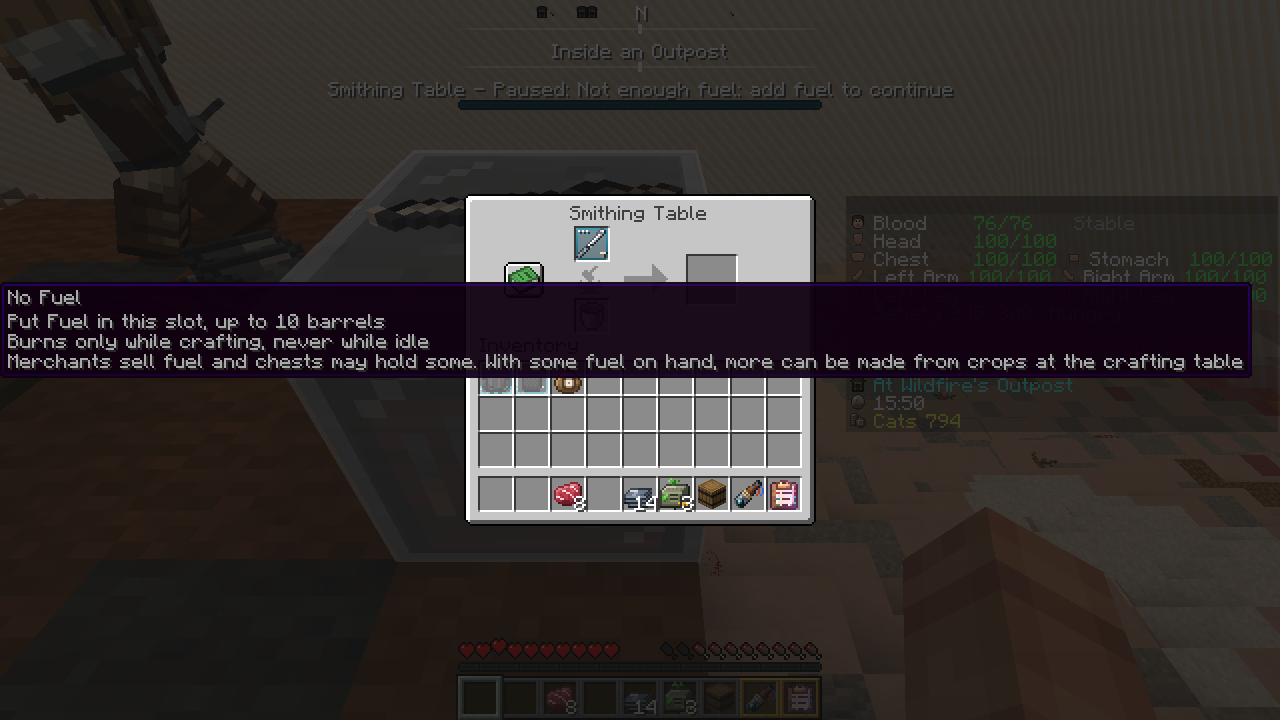
The work blocks in an outpost use one kind of energy: Fuel. This world has no generators and no power grid. The Crafting Table, Cooking Stove, Smithing Table, Anvil, and Loom all burn it directly when they make things. With no Fuel in a station, the work order is paused.
How to add it
Link to the “How to add it” sectionHold Fuel and press Sneak plus Use on a work block. The whole stack goes in, up to 10 barrels, and the rest stays in your hand. You can also put Fuel into the fuel slot at the bottom of the work block screen (Sneak plus Use).
Two things to know first:
- Once in, it can’t be taken out. Fuel is only ever burned, or packed up together with the work block (see “Moving and dismantling” below).
- Only the people of the outpost can add it. The owner of the outpost and squad members can. Visitors can’t. Public work blocks in towns are supplied with Fuel by the town. You don’t need to add any, and you can’t.
When it burns
Link to the “When it burns” sectionFuel is burned only while crafting is moving forward. An idle work block uses none. How much one batch of a recipe burns depends on the work block’s energy use, the recipe’s work time, and how many batches you make. The more energy a work block uses, the more Fuel it takes: the Anvil takes the most, and the Cooking Stove and Crafting Table the least.
The work time one barrel of Fuel covers is roughly as follows (work time is the unit for the amount of work in a recipe; for the work time of each recipe, see Recipes: Crafting Table and Cooking Stove and Recipes: Smithing Table, Anvil and Loom):
- Cooking Stove, Crafting Table: about 73 work time. Drying one piece of Dried Meat or baking one loaf of Bread takes only about 0.01 barrels each.
- Loom: about 37 work time.
- Smithing Table: about 18 work time. Forging the cheapest Iron Club takes about 0.11 barrels. A Katana of the highest grade takes about 1.75 barrels.
- Anvil: about 15 work time.
You can see how much will be burned before you craft: the preview says how many barrels one batch burns.
When there isn’t enough
Link to the “When there isn’t enough” section| Situation | What happens |
|---|---|
| The Fuel inside isn’t enough for one batch | The result preview still shows, but clicking it makes nothing, and it says how many barrels are needed and how many are left |
| Too many batches ordered at once | The number of batches is reduced automatically to what the Fuel covers, and you are told how many it is enough for |
| Not enough inside, but you have Fuel in your pack | The fewest whole barrels needed are taken automatically from your hotbar and pack and added, up to 10 barrels at a time, and faint text on the action bar says how many barrels were taken |
| The Fuel runs out halfway through | The work order is paused, the top slot says “Not enough fuel: add fuel to continue”, and work carries on once Fuel is added |
Where to get it
Link to the “Where to get it” section- Starter kit: 2 barrels are given the first time you enter the outpost, 1 of them already inside the Cooking Stove.
- Merchants: they sell it.
- Chests: it may turn up in chests across the world.
- Make it yourself: made from crops at the Crafting Table, with no blueprint needed. Greenfruit ×4, Hemp ×4, or Wheatstraw ×4 each make 1 barrel. One batch is 4 work time, about 6 minutes for a beginner, and the Crafting Table itself burns about 0.05 barrels while making it, which leaves a good net gain.
No shop buys Fuel you made yourself. It is only good for burning.
Moving and dismantling
Link to the “Moving and dismantling” sectionWhen a placed Cooking Stove, Smithing Table, Anvil, or Loom is packed up, the Fuel inside stays in the item, and the item description says “Contains N barrels of fuel”. When it is placed again, the Fuel is in the newly placed one.
Taking down a Crafting Table, or dismantling a built Cooking Stove or Weapon Smith, returns only whole barrels of Fuel. Any part of a barrel is simply burned off. When you take it down, chat says how many barrels were returned and how much was burned off.
Other things that use Fuel
Link to the “Other things that use Fuel” section- Skeleton repair bed: it burns Fuel while repairing. Without Fuel you can only rest on it, with no repair. Hold Fuel and press Use on the repair bed to add some. See Prosthetics, Wear and Repair Beds.
- Burning Pit: hold Fuel and press Use on the pit to light it. One barrel burns for 2 minutes, adding another barrel while it is still burning extends the time, and it builds up to 10 minutes at most. See Corpse Furnace and Burning Pit.
| Situation | Number | Notes |
|---|---|---|
| Most Fuel one work block can hold | 10 barrels | Same for adding by hand and automatic top-up |
| How much Fuel you start with | 2 barrels | 1 of them is already inside the Cooking Stove |
| How long 1 barrel lasts in a Cooking Stove or Crafting Table | About 73 work time | These two burn the least |
| How long 1 barrel lasts in a Loom | About 37 work time | Burns 2× as fast as the Cooking Stove |
| How long 1 barrel lasts in a Smithing Table | About 18 work time | Burns 4× as fast as the Cooking Stove |
| How long 1 barrel lasts in an Anvil | About 15 work time | Burns 5× as fast as the Cooking Stove |
| How fast the Skeleton Repair Bed burns Fuel | Same as the Anvil, 1 barrel about 15 work time | Only while repairing |
| How much Fuel one item burns | That block’s burn rate × work time × batches | Example: Armour Plating, 6 work time at the Anvil, about 0.41 barrels |
| Making your own Fuel at the Crafting Table | 4 crops for 1 barrel, 4 work time | Greenfruit, Hemp or Wheatstraw all work |
| How long 1 barrel burns in a Burning Pit | 2 minutes | More Fuel adds up, to 10 minutes at most; light it by holding Fuel |
See also
Link to the “See also” sectionOfficial siteHow to joinWorld mapFAQ
DustMoon.net is not an official product of Mojang Studios or Microsoft, and is not approved or endorsed by them.
DustMoon is inspired by the world of Kenshi and is not affiliated with Lo-Fi Games.
© 2026 DustMoon.net