
Visitors, Inn and Shop Counter
Other people can enter your outpost too. Other travellers can walk in to look around, hire people, and pay to stay a night. Passing squads and the residents of nearby towns come to your Shop Counter to buy things and to your inn to spend the night. There are only two conditions: the counter needs someone minding it, and the inn needs beds.
Entering someone else’s outpost
Link to the “Entering someone else’s outpost” sectionFrom outside, nobody’s outpost can be seen. Walk within 64 blocks of the boundary of someone else’s outpost and a line appears in chat, “X’s outpost is nearby”, followed by a clickable [Visit as a guest]. The reminder comes only once every 10 minutes for the same outpost, and that line is your only clue that someone lives here.
The other way: open the [Outpost] page of the slot 9 menu. When someone else’s outpost is nearby, [Visit X’s Outpost] buttons are added, up to 3.
Both ways are the same in that you have to stand within 64 blocks of the boundary. If you are too far, you are shown how close you need to get. You can go in whether the owner is online or not. Going in, you walk through the boundary from the side where you were standing, facing the centre of the outpost. The ground where you arrive is loaded before you are let in.
Times you can’t go in: you are already inside an outpost (leave it before going to another), you are choosing a character, you are enslaved, you are being held or escorted, someone is heading your way, or you are carrying someone as a visitor.
If you log off inside someone else’s outpost, you are still inside when you log on. If that outpost no longer exists, is being expanded or shrunk, or can’t be entered for the moment, you return to where you were before you went in.
What visitors can do
Link to the “What visitors can do” sectionAs you enter, chat lists all the rules that apply.
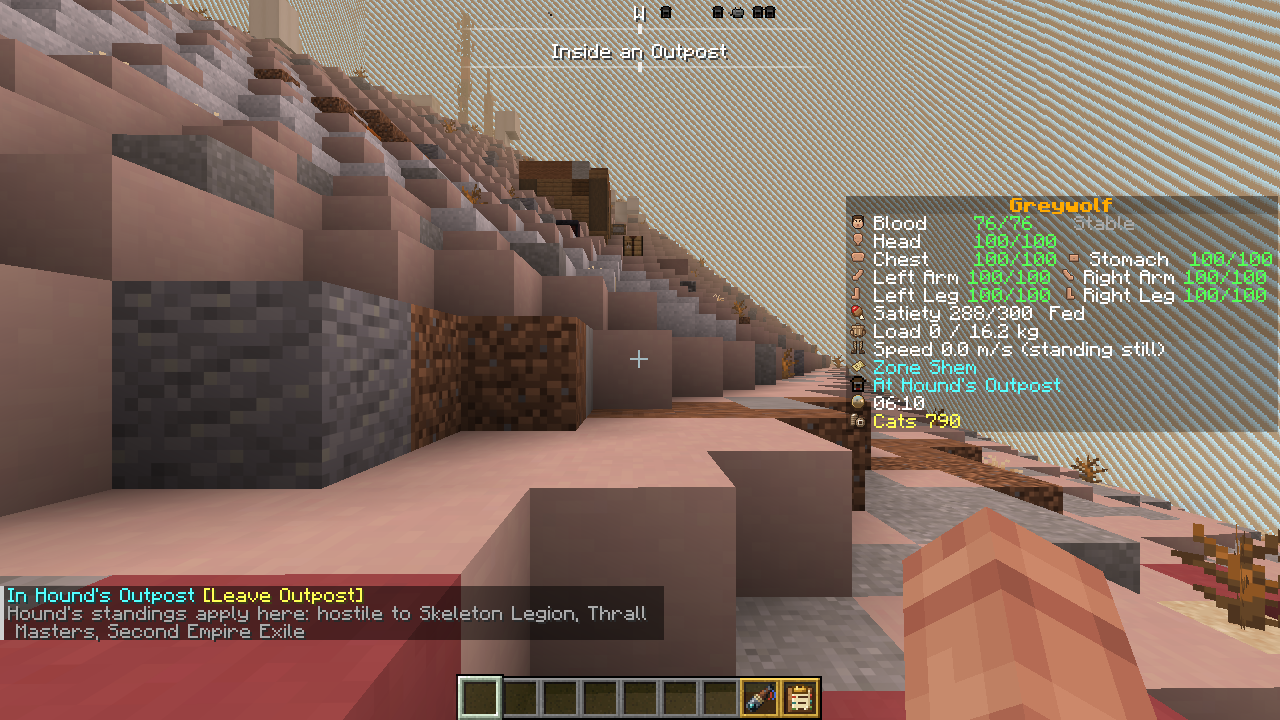
| Allowed | Not allowed |
|---|---|
| Walk around, open doors (including trapdoors and fence gates), press buttons, ring bells | Place or take down blocks, build inside |
| Talk to people, hire people | Open containers such as Chests and Barrels; use the Crafting Table and stations, add Fuel to stations |
| Pay to stay in an inn bed | Sleep in the owner’s beds, use the Skeleton repair bed |
| Take back what is on your own corpse, carry your own squad members | Gather, harvest crops, pick up other people’s things, search other people’s corpses, carry other people |
| Rewrite signs; break item frames, armour stands, paintings, vehicles; press [Wait] for the outpost; use the Corpse Furnace and the Burning Pit |
For every action that is refused, you can see the reason. A visitor’s [Outpost] page has no [Abandon Outpost]. Other characters on the same account also come in as visitors, and can’t open the owner’s Barrels either.
A player in the owner’s party is a party member and has more rights than a visitor (placing blocks, using stations). For details, see Outpost. A party member who leaves the party or is removed from it while inside stays where they are, but as a visitor.
Shop Counter
Link to the “Shop Counter” sectionBuild a Shop Counter from [Outpost] → [Build]. It is an indoor object and has to be set inside a building with a roof. The Barrel on the counter holds the stock and also takes the money: put in what you want to sell, and the money from sales is put back into the same Barrel as cats. When the Barrel is full, the cats drop onto the counter, so remember to leave free slots.
Open only with someone minding it
Link to the “Open only with someone minding it” sectionCustomers don’t come to a counter nobody is minding. Two things count as minding it:
- You are present yourself: you are in the outpost and able to stand (not downed, not captured). A “Minding the shop” progress bar shows at the top of the screen.
- A squad member is assigned to mind the shop: aim at the counter’s Barrel and the action bar shows “Press F to send a squad member to mind the shop”. Press F, then click a squad member. They walk over and stand by the counter, and one person can mind every counter in the same outpost. Minding the shop costs nothing and makes no difference to how well things sell.
You are notified whenever the squad member minding the shop dies, is downed, is captured, or leaves the counter. Aim at the Barrel then and you see “X is not minding the shop right now. Press F to send someone else”. Also, while you have the Barrel open, that counter doesn’t sell.
Who comes to buy
Link to the “Who comes to buy” section- Residents of a nearby town: if there is a town within 460 blocks of the outpost, some of that town’s residents come to your place to buy a meal when they are hungry. The more you sell, the fewer come afterwards. There is a limit on how much is sold per hour, and a limit on the combined counters of all players around one town as well. The same resident buys from you only once an hour. With no town nearby, no residents come.
- Passing squads: travellers moving around nearby buy from their own shopping lists. The most common items on those lists are food, drink and medicine, and first aid supplies, and a few people buy farm produce, materials, tools, or trade goods. The same squad comes only once per day-and-night cycle (about 20 minutes in real time) and buys one item of each type at most.
- Weapons and armour depend on the person: only someone carrying no weapon, wearing no armour in that slot, or wearing something clearly worse than your piece will buy, one piece per person per day-and-night cycle at most. Nobody buys crossbows.
If you have fallen out with the local faction, people still come to your door, but they come to fight, not to buy. The food in the counter is also a target for raiders. See Outpost Raids.
Anything put into the Barrel automatically carries its list price, and hovering over the item shows the price and the list price. To change the price, Shift + right-click the item in the Barrel and a pricing window comes up: type a number and click the slot on the right to confirm, click the middle slot to return to the list price, or press Esc to leave it unchanged.
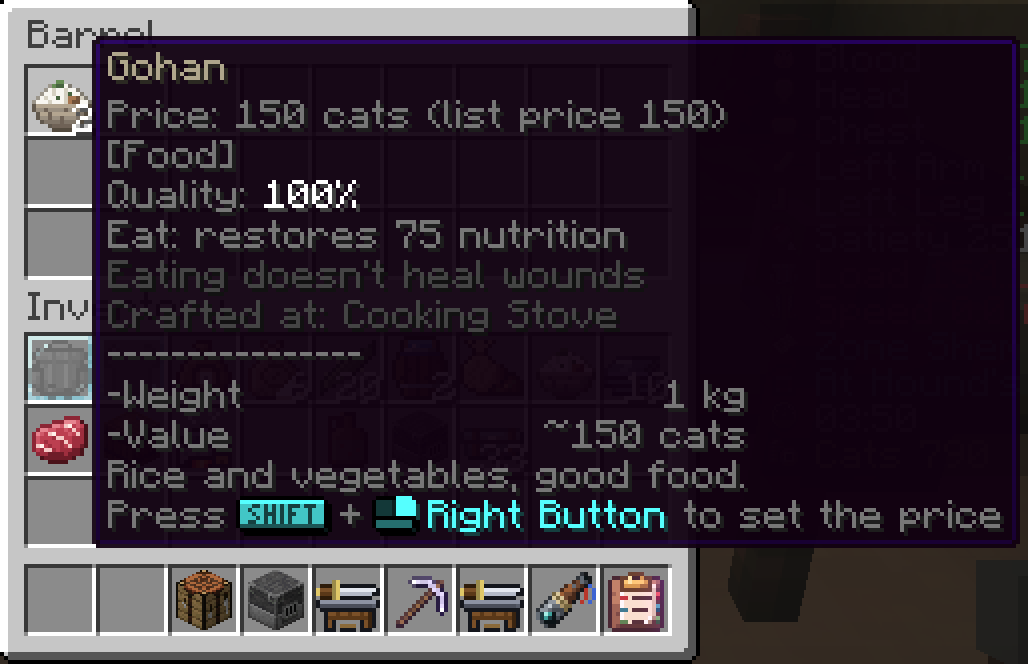
- Stackable items (same name, same quality, and the same in whether they are self-made) share one price, applied across all your counters. Items that don’t stack, such as gear and first aid kits, are priced one by one.
- The lowest price is half the list price. When nearby shops sell for less than that, you can go down to match the shops. Any lower and customers take it for goods of unknown origin.
- The highest price is 2.5 times the market price (when the list price is already higher than that, the list price is the limit). Self-made goods have a separate limit: 90% of the price of the materials.
- The “market price” is what shops charge for the item in the town the counter serves. Priced at or below the market price, customers buy it if they want it. Priced higher, it only sells when the area is short of it or the customer has money to spare. The window shows what will happen as you set the price.
What a counter can’t sell
Link to the “What a counter can’t sell” sectionNobody buys the following even if you put them in, and the reason is written in the item description or on the counter: items issued at the start, bound gear, Blueprints and Recipes, stolen goods, contraband in this area, Ash, Compost, self-made Fuel, self-made goods that can’t be traded, and self-made goods worth less than 1 cat at 90% of the price of the materials. No customer wants clothing, prosthetics, Bolts, or Books, so sell those at the shops in town. See Unsellable and Not-for-sale Items.
While you are away
Link to the “While you are away” section- You are online but not in the outpost: a counter with a squad member minding it sells as usual, both food and other goods, and reports how much was sold every 5 minutes. The inn needs nobody minding it and takes guests as usual.
- You are offline: only food is still sold, to residents of the nearby town, and three things have to be true at once: a squad member is minding the shop, this character is the one played last on this account, and you haven’t been offline for a full 72 hours. Other goods aren’t sold, and the inn takes no guests. Much less is sold per hour while offline than while online. Customers from the same town go to owners who are online first.
- When you log on, you receive a summary: how much was sold, how long you were offline, the income, and the best-selling items; how much was looted and how many times hostile people came; and if selling stopped, the reason.
An inn needs a Shop Counter before it can open. The requirements:
- The outpost has a Shop Counter, and it is indoors, under a roof with walls on every side.
- The building with the counter has at least 4 beds. They have to be Beds from [Build]. Camp Beds don’t count.
- Under [Outpost] → [Inn], press [Open to Lodgers] and choose a bed price: 50, 100, 150, 200, or 300 cats. The default is 100.
Whatever is missing is written directly on the [Inn] page.
Who stays: after dark, passing squads nearby that really need rest come to the door. The wounded want to stay most, then those short of food, then those in a hurry. Those who can’t pay the bed price don’t come. Those whose own town still has free beds in its Bar mostly stay in town. The higher the bed price, the fewer come, and the number of free beds is the limit. Each inn gets its own guests, and players don’t compete for them.
How payment works:
- The owner, party members, hired hands, and allies stay free. Hostile squads aren’t allowed to stay, and when they come to the door they come to fight.
- One squad shares one bed, and is charged only once within 20 minutes of real time.
- Room money from passing squads goes straight into the owner’s cats. Your character has to be online, and the inn takes no guests while you are offline. It doesn’t matter if you aren’t in the outpost.
- A visiting player who presses Use on an inn bed first sees the room price and their cats before and after paying. The money is deducted only after they confirm, and it goes into the counter Barrel. If the Barrel has no room, they can’t stay.
Your outpost marker on the world map shows “Inn beds free” and “Guests tonight”.
Choosing a site
Link to the “Choosing a site” sectionThe confirmation box for creating an outpost states in advance about how many squads a day would stay around here and which town is nearest. When the area is mostly a hostile faction, it says outright “visitors come to fight”. An outpost can’t be moved once created, so if you want to do business, read it carefully before you press the button. For the other rules between players, see Rules Between Travellers.
| Situation | Number | Notes |
|---|---|---|
| How close travellers get before they’re told an outpost is ahead | Within 64 blocks of the outpost boundary | Once every 10 minutes for the same outpost |
| Most outposts the [Outpost] page lists to travel to | 3 | |
| When the owner counts as home | Inside the outpost | Not while downed or captured |
| Where the residents who come to eat are from | The nearest town within 460 blocks | One outpost serves only one town |
| Most meals one owner sells an hour | 15% of that town’s diners per hour | All players’ counters around that town combined: 30% at most |
| How often the same resident eats with you | 1 meal an hour at most | At the same owner’s counter |
| Most meals sold an hour while you’re offline | 2.5% of that town’s diners per hour | Example: a town with about 300 diners an hour, 8 at most |
| How long offline before the counter stops selling | 72 hours | Counted afresh after you log on |
| Lowest price you can set | Half the list price, rounded up | Can go down to the shop price when nearby shops charge less |
| Highest price you can set | 2.5× the market price | Things you made yourself: 90% of the price of the materials |
| The most a customer will pay | Market price × shortage (up to about 1.67×) × money to spare (up to 1.5×) | At or below the market price it always sells as usual |
| When a customer buys your weapons or armour | Yours is 25% or more better than what they have | One piece per person per day-and-night cycle at most |
| How often passing squads come | Once per day-and-night cycle (about 20 minutes in real time) | One item of each type at most |
| How many beds an inn needs | At least 4 in the same building | Camp Beds don’t count |
| How long one night’s stay is | 20 minutes of real time | One squad on one bed pays only once in that time |
| Who stays at the inn for free | Allies at relations +50 or higher | Anyone at −30 or lower isn’t allowed to stay |
See also
Link to the “See also” sectionOfficial siteHow to joinWorld mapFAQ
DustMoon.net is not an official product of Mojang Studios or Microsoft, and is not approved or endorsed by them.
DustMoon is inspired by the world of Kenshi and is not affiliated with Lo-Fi Games.
© 2026 DustMoon.net