
Character Creation
Left-click an empty seat at the camp and the ring of human outlines stands up and walks to the campfire. Over the next dozen or so pages you decide this character’s race, looks, and origin. Everything can be changed until you press Play. After that, the looks can still be changed by paying someone, and the race can never be changed.
Starting and leaving partway
Link to the “Starting and leaving partway” sectionSelect an empty seat at the character camp and left-click to start on the spot. A new account does not need to click: the camp counts down 3 seconds and starts by itself.
Right-click on the first page to return to the camp, and nothing is kept. Disconnecting partway is the same: no half-made character is left behind. While you are creating a character you have not entered the world yet: nobody can see you and nothing can hit you. If you are in third person, the screen prompts you to press F5 and switch back to first person.
How to operate it
Link to the “How to operate it” sectionThe key legend is always shown at the top of the screen:
- A/D: change the option.
- Left-click: continue to the next page. On the confirm page this key is Play.
- Right-click: go back one page. It only returns to pages that actually appeared; skipped pages do not come back.
- W/S: change page when there are enough options to fill several pages.
- Move the mouse: turn the figure on the spot to see what the back looks like.
Space can stand in for left-click, and left Shift for right-click.
What each page asks
Link to the “What each page asks” sectionThe order is: Language → Race → Type → Role → Sex → Hair → Hair colour → Beard → Height → Build → Origin → Town → Confirm. A page with only one answer is skipped: Hivers and Skeletons have no Sex page, only males are asked about a beard, and for the Shek the “Hair” page asks about horns. When each page appears is set out in the Data section at the bottom.
- Language: Traditional Chinese or English. Press A/D and the whole screen switches to that language at once. What you pick here is your language for the game from then on. To change it later go to Preferences; see Settings.
- Race, Type, Role, Sex: each option has one line under it that says how the world sees that race, for example “Holy Nation attacks on sight” for the Skeleton. For strengths and weaknesses in more depth, see Races.
- Animals: the last slot on the Race page is Animals. Its icon is a Bonedog, and the line under it reads “Mute; no clothes, no weapons”. Click into it and the next page is titled Species: A/D changes the species, and the preview by the campfire changes to that animal. Each species has its own line too, for example the Goat’s “Small and weak; swims”, the Bonedog’s “Drawn to corpses; grabs limbs”, the Bull’s “Strong hauler; can’t go indoors”, and the Swamp Turtle’s “Hard shell, meaty; can’t attack”. Species you haven’t unlocked show their line as well. The preview is the animal itself as it appears in the world, so the Swamp Turtle carries its shell; the camera keeps the whole animal in view, clear of the campfire and the nameplate. On the Species and Origin pages the animal starts use that animal’s own creature icon, the same one as in the Journal. See Playing as an Animal.
- Height: up to five steps, from Short to Tall. It changes body size only. Running speed, jumping, and reach all stay the same. A tall person walking through a low door ducks and crouches through by themselves.
- Build: Standard or Slim. The difference is the thickness of the arms. It is asked only when that body has both.
Colours stand for difficulty
Link to the “Colours stand for difficulty” sectionThe colour of an option’s name stands for difficulty: white is ordinary, yellow is a challenge, red is very hard, and grey is not unlocked yet. On the Race and Type pages, the colour follows the easiest origin that race can pick.
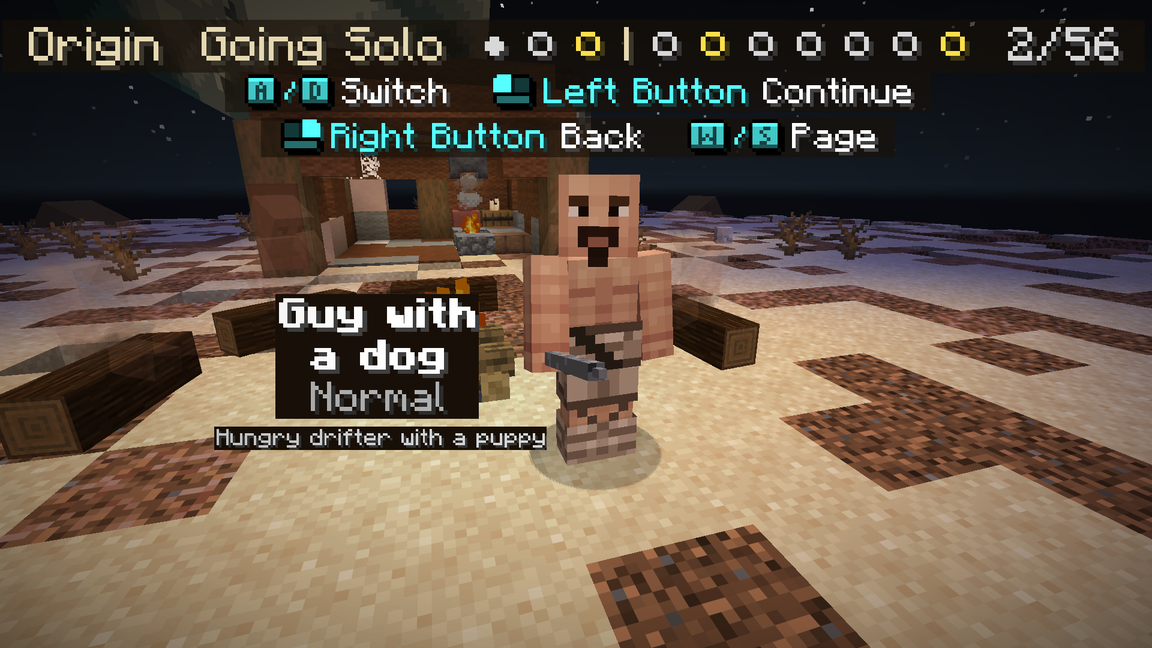
On the Origin page each name has two more lines under it: one for difficulty (Beginner, Normal, Veteran, Very Hard, and so on) and one that sums up the origin in a sentence. A grey origin shows “Locked” with the unlock condition and your current progress. The rarer ones show only “??? · A rumour somewhere”. You can stop on a grey option and look at it, but left-clicking only shows that it is not unlocked yet. For how to unlock them, see Unlocking Origins.
Origin and starting town
Link to the “Origin and starting town” sectionThe Origin page lists every origin for the race in two groups: “Going Solo” (one person, no friendly faction) comes first and “Others” comes after, each sorted from easy to hard. Next to the title you can read which group you are in, which position, and how many there are. W/S jumps straight to the other group.
A new character can pick only two: The Wanderer (alone, a club and a few coins) and Hub Thief (lifts purses from passers-by; open only to Greenlanders, Scorchlanders, and Hivers). The rest are listed but grey. For what each origin carries and where it starts, see Origins.
Before you pick an origin, the figure has only a body and hair. Once an origin is selected, the figure puts on that set of gear and the companions appear by the campfire.
The Town page is skipped most of the time, because most origins have a fixed starting point. There are three exceptions:
- The Wanderer: only the Hub at first. For Squin, Sho-Battai, World’s End, Stack, and Bast, each town that any character on the account has walked into becomes one more starting point. Stack is for Humans only.
- Drifter, Bugmaster’s Heir: start from any town that any character on the account has walked into.
- Other origins with more than one starting point: the first option is “Random”.
Last comes the Confirm page: a nameplate with the origin name and one sentence. Left-click to start; right-click still takes you back to change things.
After you press Play
Link to the “After you press Play” sectionA short scene plays by the campfire, about 7 to 9 seconds long, and its content depends on your character: squad members may stand up together, animals make an entrance if you bring any, and a character in shackles or missing an arm has a scene of their own. A dry birthplace may raise a dust storm and a rainy one may bring rain. It is a little different every time. Left-click, Space, or Shift skips it.
The screen fades to black and waits for the terrain of the birthplace to load. The camera then descends from the sky to your eyes and control is handed back to you. Pressing a movement key halfway through the descent ends it early. The gear, squad members, and animals that come with the origin are given in full, free of charge, and are bound to this character. The starting cash is given only once per account. About 3 seconds after landing, a line of hints appears in chat; see Getting Started.
What cannot be changed once set
Link to the “What cannot be changed once set” sectionRace can never be changed. To change race, the only way is to create another character.
Appearance can be changed, but it takes a visit and money. A Plastic Surgeon sits in some bars, and there is also Doctor Chung; both charge 200 cats. Members of the Shinobi Thieves can go to the Guild Plastic Surgeon for free, and he does not help non-members. Paying opens the appearance editor, where the race still cannot be changed. If you press cancel and change nothing, the money is returned.
Surgery changes looks only: where you are, what you carry, and how many cats you have all stay the same, and the starting kit is not handed out again.
| Page | When it appears | Notes |
|---|---|---|
| Language | Always asked | Traditional Chinese, English |
| Race | Always asked | 7 open to a new character |
| Type | When the race has several types | Hive, Skeleton, Fishman, Cannibal, Animals (for animals this page is titled Species, with 7 kinds) |
| Role | Hive | Prince, Worker Drone, Soldier Drone |
| Sex | Greenlander, Scorchlander, Shek, Cannibal | Skipped for other races |
| Hair | When there are two or more to choose from | Horns for the Shek |
| Hair colour | When the chosen hair has two or more colours | |
| Beard | Male, with two or more to choose from | |
| Height | When there are two or more steps | Short, A bit short, Average, A bit tall, Tall |
| Build | When that body has two builds | Standard, Slim |
| Origin | Always asked | Up to 6 per page |
| Town | When there are two or more starting points | |
| Confirm | Always asked | Left-click to start the game |
| Colour | Meaning | Difficulty words that appear |
|---|---|---|
| White | Ordinary | Beginner, Normal, Mixed |
| Yellow | A challenge | Veteran, Harder |
| Red | Very hard | Very Hard, Dodgy |
| Grey | Not unlocked yet | Locked, Coming soon |
| Situation | Number | Notes |
|---|---|---|
| How long the opening campfire scene lasts | About 7–9 seconds | Left-click, Space or Shift skips it |
| How long the camera takes to come down when you land | About 2 seconds | After 1 second, pressing a movement key ends it early |
| What changing your looks costs later | 200 cats | At a plastic surgeon or Doctor Chung; free for Ninja Thieves members at the guild surgeon |
| How soon the first hint appears after landing | About 3 seconds | Once per character |
See also
Link to the “See also” sectionOfficial siteHow to joinWorld mapFAQ
DustMoon.net is not an official product of Mojang Studios or Microsoft, and is not approved or endorsed by them.
DustMoon is inspired by the world of Kenshi and is not affiliated with Lo-Fi Games.
© 2026 DustMoon.net