
HUD, Messages and Scoreboard
Any one thing appears in only one place. What has just happened to you is in the middle of the screen, what you need to watch all the time is on the scoreboard on the side of the screen, what concerns someone else is written above their head, and anything with a countdown is in a bar at the top of the screen. Once you know where each kind of message goes, you can find what you are looking for however much text is on screen.
What each place shows
Link to the “What each place shows” section| Place | What goes there |
|---|---|
| Small text in the middle of the screen | What has just happened to you |
| Scoreboard on the side of the screen | States you need to watch all the time |
| Nameplate above the head | What concerns someone else; see Nameplates and Skeleton Eye Scope |
| Bars at the top of the screen | Anything tied to time, with the time left stated |
| Floating text at a fixed spot | Progress at a fixed position (lockpicking, research, smithing, building); bystanders can see it too |
| Chat | Notices and long sentences in full |
| TAB list | Where you are, your squad, bounties and Threat Level, time left as an escaped slave |
| Action bar | Minor hints, and the Stealth eye icon |
When the small text in the middle of the screen would be too long, it is shown in two places: only a short key phrase stays in the middle of the screen (such as “Being looted”, “Being eaten”, or “Being carried off”), and the full sentence appears in chat.
Scoreboard
Link to the “Scoreboard” sectionThe default is the full version, where every line has a name and a state: each body part with its state word, health (oil for Skeletons), satiety and its stage, encumbrance and speed (walking, running, sneaking, crawling), the time of day in the world and the weather in the area, cats, the area or town or base, bounty, disguise, and how much you look like a slave. For what the values mean, see Body Parts and Health and Bounty.
Under Preferences… → Scoreboard… in the slot 9 menu you can switch between three settings:
- Full: every line has a name and a state.
- Compact: icons and numbers only, with abbreviated units. After 5 seconds in a row with the whole body unharmed, the body part lines fold away. Bounty shows only faction abbreviations and the total, for two factions at most.
- Hidden: nothing is shown, and bleeding and worsening wounds are announced in the middle of the screen instead.
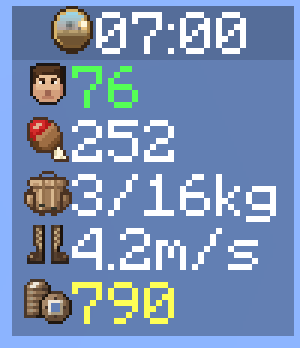
The compact version lets you switch fourteen items on and off one by one: character name, time, weather, health (oil for Skeletons), body parts, body parts shown even when all are full, satiety, encumbrance, speed, location, disguise, looking like a slave, cats, and bounty. Changing an item while on Full or Hidden switches to Compact automatically.
Bars at the top of the screen
Link to the “Bars at the top of the screen” sectionUp to 3 at once. When there isn’t room, they are kept in this order of priority: death, unconsciousness, and bodily condition > things that need your response > actions in progress > destination > others. Once the matter is over, its bar disappears.
Common ones include: the unconsciousness countdown, where you are being carried (how many blocks left and roughly how long), lockpicking (the lock’s level and how far along you are), struggling free of ropes, a search, standing still, surrender or resisting arrest, the trespass countdown, leaving after release from jail, falling behind your escort, being drunk, someone bandaging you, a squad member on the way, each stage of a base raid, and “X suspects you” and “X is about to attack”. A siege has its own bar, giving direction, distance, and the number still attacking. Reinforcements drawn by a Threat Level, a defending army’s hunt, and a town falling into anarchy each have a bar too. The time left on a bounty and as an escaped slave takes up no bar; it is written in the TAB list.
The TAB list
Link to the “The TAB list” sectionHolding TAB doesn’t show a list of online players. It shows information about you:
- Where you are: the place name and who holds this area. When the town is in an unusual state, a phrase follows: “Unguarded (N min left)”, “Anarchy (N min left)”, “Looted Ruins”, “Martial law (N min left)” or “Martial law because X fell into anarchy (N min left)”; a town under attack, under siege, or recovering shows phrases such as “Under attack (N (faction), no restocking)”, “Besieged by X (retreats in about N)”, “X on the march (arriving in N min)” or “Recovering from a siege (normal in about N min)”. See Threat Level, Anarchy and Rebuilding After War.
- Squad: one row per squad member, with health, what they are doing, and distance.
- Bounty: the total is on the right of the heading, and below it each faction has a row with the amount and how many minutes until it clears. With a Threat Level, the line under the heading reads in red “Threat Level X III (85/100)”: 85 people knocked down in that town, with the next level at 100. While you are an escaped slave, an extra red line, “Escaped slave (N min left)”, comes after the Threat Level and before the factions; it shows even with no bounty, in which case the heading has no total on the right.
Area frames
Link to the “Area frames” sectionA red frame means you should leave: private homes, other people’s outposts, closed shops, barracks, police stations, prisons, and the grace period for leaving after release from jail. Green means you should stay: slave labour camps, and following along while under escort. Beside the frame there is a countdown and a line of explanation, and a message that you have left appears when you walk out. Frames are always shown, with no personal switch. For the rules, see Trespassing.
What chat shows
Link to the “What chat shows” section- [Sighted]: things really happening in the distance that can be seen from where you stand. Only events more than 48 blocks away are reported (up to 96 blocks), with direction and distance. Click the line and the people involved glow for you alone for 8 seconds, while the view turns smoothly towards them. Six lines per minute at most, and the same kind of event isn’t repeated within 120 seconds.
- What residents say to you, written as ‘X says to you: “…”’.
- Records such as “Added to journal”.
Action bar and the Stealth eye
Link to the “Action bar and the Stealth eye” sectionThe action bar carries only minor hints: faint text, the same hint once in 60 seconds at most, nothing during a fight, while unconscious, or with a menu open, and each hint is cleared when its state ends.
While sneaking, an eye icon comes first: a closed eye means you haven’t been noticed, a half-open eye means you are about to be, and an open eye means you have been. Anyone looking at you glows for you alone. For the rules of Stealth, see Stealth and Disguise.
Damage numbers
Link to the “Damage numbers” sectionWhite text is damage you dealt, bold gold text is a special move, and small pale grey text is damage dealt by others. Hits on the same target within half a second are merged into one total. By default you see only your own, and this can be changed to “All” or switched off. For combat values, see Melee Combat.
Preferences
Link to the “Preferences” sectionAll of these are under Preferences… in the slot 9 menu:
- Display: Nameplates, Squad Glow, Damage numbers, Item Glow, Payment Amounts, Shader Compatibility.
- Sound and dialogue: Dialogue in Chat (All / No Squad / OFF), Overheard Chatter, Skill Level-Ups, Chatter Sounds, Heavy Footsteps.
- Scoreboard…, and Language (Traditional Chinese / English / Use Game Language).
Settings are saved with your account. Hovering over any button shows a line explaining what it is for.
| Situation | Number | Notes |
|---|---|---|
| Longest the small text in the middle of the screen can be | 8 full-width characters in the Chinese text | Longer text keeps only the key phrase; the full text goes to chat |
| Most timer bars at the top at once | 3 | Kept by importance |
| Escaped-slave time left in TAB | Shown in minutes, rounded up | Never less than 1 minute |
| When the compact scoreboard folds away the body parts | Whole body unharmed for 5 seconds in a row | |
| How far away [Sighted] events are | 48 to 96 blocks | Nearer ones aren’t reported |
| How often [Sighted] appears | 6 lines per minute at most | The same kind of event only once per 120 seconds |
| How long a [Sighted] target glows | 8 seconds | |
| How often the same action bar hint appears | Once per 60 seconds at most | |
| How damage numbers are merged | Hits on the same target within half a second become one number | |
| How far away you see damage numbers | Others’ hits: within 16 blocks | Your own: up to 32 blocks |
See also
Link to the “See also” sectionOfficial siteHow to joinWorld mapFAQ
DustMoon.net is not an official product of Mojang Studios or Microsoft, and is not approved or endorsed by them.
DustMoon is inspired by the world of Kenshi and is not affiliated with Lo-Fi Games.
© 2026 DustMoon.net