
Exploring
At the start you know very few places. The World Map, the compass and the Known Places list show only the places you know. A place is added to your map when you walk to it, ask for directions, read a map, or hear about it from someone. A place you don’t know is blank on the map, even when it is right in front of you.
Three levels of knowing
Link to the “Three levels of knowing” section| Level | How you get it | How it looks on the map |
|---|---|---|
| Heard of | Asking for directions, intel from passers-by, the places given at the start | Grey icon, grey place name; the list reads “Heard of, not visited yet” |
| Seen | Reading a map item, places near your starting town | Normal icon, but some places show only what they look like from a distance, such as “Village”, “Unknown tower” or “Strange town”; the list reads “Seen from afar, not entered yet” |
| Visited | Walking there yourself | Normal icon, real name |
All three can be marked, travelled to automatically, and used for Fast Travel. A level only goes up, never down: walk to a place you had heard of and it becomes visited, and no amount of asking afterwards puts it back.
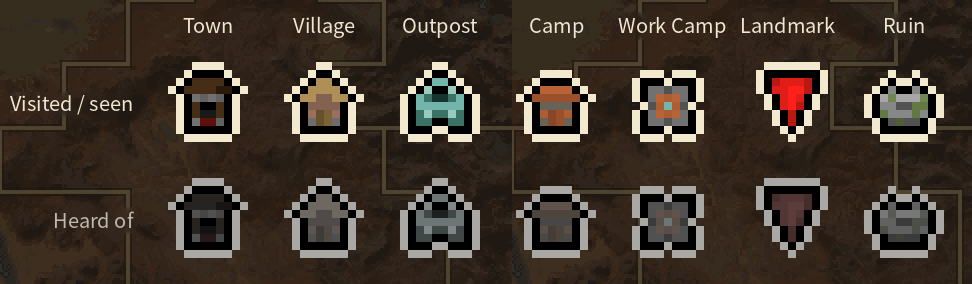
There are seven kinds of place marker: Town, Village, Outpost, Camp, Work Camp, Landmark and Ruins. This is how the map sorts its markers, and it doesn’t match the types in the List of Settlements exactly.
What you know at the start
Link to the “What you know at the start” sectionThe first time a new character stands in their starting town, that town counts as visited, and a batch of places is added as heard of:
- major towns within 5,000 blocks of the starting town;
- the capitals of the three great factions — Blister Hill of the Holy Nation, Admag of the Shek Kingdom, Heft of the United Cities — if they are within 5,000 blocks; the capital of your own faction counts at any distance;
- places drawn on the maps sold in shops around your starting town (within 5,000 blocks);
- the nearest town within 3,000 blocks that isn’t already on the list.
If that comes to fewer than 3 places, the nearest towns are added to make 3. The most is 8. Secret places, private places, ruins, nests and minor places are never among them. Other places near the starting town (within 192 blocks beyond the town’s edge) count as seen. A character who starts in the wilds, outside any town, has the first town they walk into treated as the starting town. For where each origin sets out from, see Origins.
Walk there and you know it
Link to the “Walk there and you know it” sectionWhen you come within 64 blocks of a place’s edge, “New place found: X (X)” appears in the middle of the screen with the place’s name and marker type, and the place becomes visited straight away. What counts is where your character’s body stands; flying the camera over while spectating doesn’t count.
After that, each time you walk into a town’s area you see “Entering X (X)”; crossing into another region shows “Entering X”. For how regions are divided, see World and Regions.
Asking for directions
Link to the “Asking for directions” section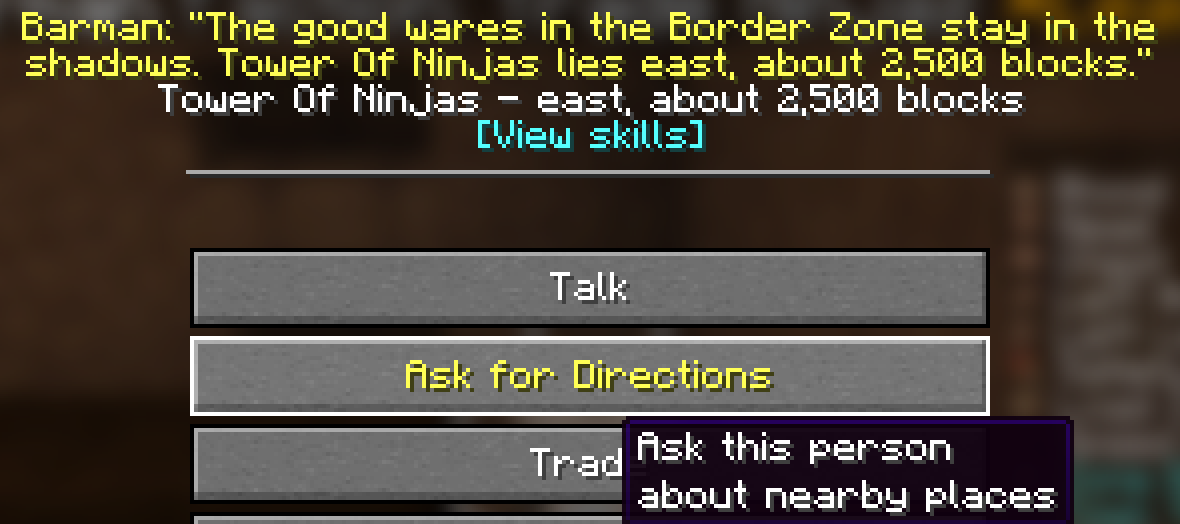
Open the interaction menu on someone willing to talk and choose Ask for Directions. They tell you which direction a place lies in and roughly how many blocks away, and once you hear it the place is recorded as heard of. Chat adds a line with the place; click it to mark the place.
Which place they name follows an order:
- The place they are heading to themselves — they say they are headed there, and give the direction and the rough distance in blocks.
- Otherwise they pick a place 2,000 to 3,000 blocks away, which can be a town, village, outpost or ruin — “Word is it’s worth the trip.”
- If nothing lies at that distance, they name the nearest place.
For 10 minutes the same person gives the same answer, whoever asks and however many times. To learn more places, ask more people. Each speaks in the manner of their own faction, and often mentions who is on bad terms with whom around here and which beasts roam the area. Town guards give directions and also list the shops in town; click one and your character walks there. That list stays valid for 10 minutes.
Races that can’t speak don’t answer; asking only gets you “X doesn’t answer you”. See Mute Races. Named characters each have their own temper: some answer plainly, some change the subject, and some ignore you outright.
Map items and intel
Link to the “Map items and intel” sectionMap items are read with a right-click: the area the map shows is listed in chat and marked on your map (as seen). Some show the towns of one faction, some show a region, and some show the road to a town. The 9 treasure maps and documents work differently: each use marks one ruin and uses up one copy. A ruin that is already marked isn’t marked again, and once every ruin is marked no more copies are used up. For the items themselves, see Maps, Blueprints and Transcripts; for how to search a ruin, see Searching Ruins.
Intel counts too. When news from a passer-by mentions a place, press Mark and the place is recorded as heard of. Even when they can only give a rough position, the list reads “Only the rough area is known”, and you can still mark it and still travel there. For where intel comes from, see Rumours and Intel.
Some things need a visit
Link to the “Some things need a visit” section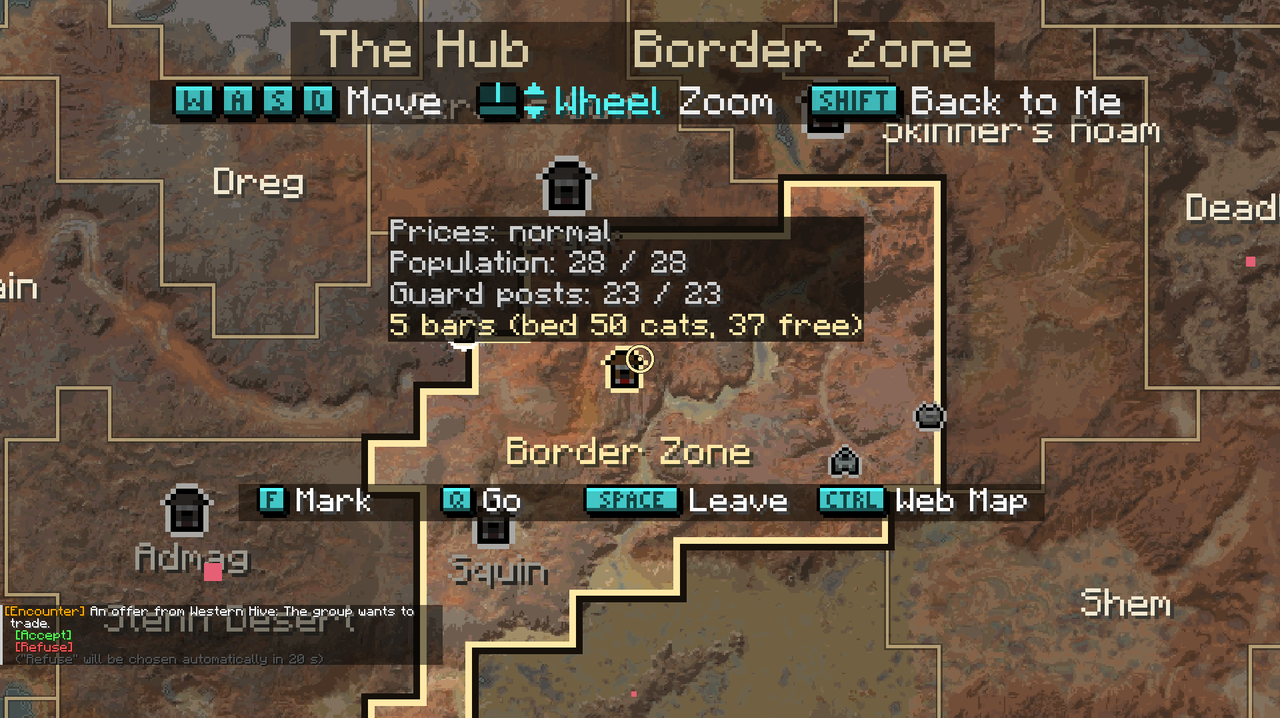
Point at a town on the World Map. A town you have visited lists its price markup, food, population and guard posts; a town you haven’t shows one grey line, “Visit to see prices, population and guards”. War status, the town’s attitude towards you (hostile, a bounty on you, your race unwelcome) and its facilities show whether you have visited or not. So before a trading run or choosing somewhere to settle, it is best to go there in person.
For how to use the map screen, compass, navigation arrows and Known Places list, see World Map and Navigation. To have your character walk there unaided, see Auto Mode. For how the Places tab of the Journal records where you have been, see Journal Tabs and Entries.
On the World Map screen, switch to Web Map and press Open in Browser. You get a link, and the map in your browser shows your own position. The link is valid for 5 minutes and works once.
Only mutual friends can see where each other are. For how to get along with other travellers, see Rules Between Travellers.
| Situation | Number | Notes |
|---|---|---|
| How close you must get for a place to count as visited | Within 64 blocks of the place’s edge | Where your body stands counts |
| Which major towns, capitals and places on buyable maps you hear of at the start | Those within 5,000 blocks of your starting town | You hear of your own faction’s capital however far away it is |
| Hearing of the nearest town at the start | The nearest 1 within 3,000 blocks | |
| How many places you hear of at the start | At least 3, at most 8 | |
| Which places you have already seen at the start | Within 192 blocks around your starting town | |
| How far away the places people suggest when you ask directions are | 2,000–3,000 blocks | If there is nothing at that distance, they name the nearest place |
| How long one person keeps giving the same answer | 10 minutes | Whoever asks |
| How long you can click the shop list a guard gives you | 10 minutes | |
| How many kinds of treasure maps and documents there are | 9 kinds | Each use marks one place and uses up that copy; a place already marked is not repeated |
| How many places are on the map | 261 in total | Town 25, Village 41, Outpost 37, Camp 7, Work Camp 5, Landmark 33, Ruins 113 |
| What places you have only seen from afar are called | More than twenty stand-in names | For example: Village, Fishing village, Unknown object, Strange town |
| How long a web map link works | 5 minutes, one use |
See also
Link to the “See also” sectionOfficial siteHow to joinWorld mapFAQ
DustMoon.net is not an official product of Mojang Studios or Microsoft, and is not approved or endorsed by them.
DustMoon is inspired by the world of Kenshi and is not affiliated with Lo-Fi Games.
© 2026 DustMoon.net