
Reading the Screen
Each area of the screen shows a different kind of information. What you always need to watch is on the scoreboard on the right, what just happened to you is in the middle of the screen, and anything with a countdown is in the bars at the top. Full sentences and distant events are in chat, and what other people are doing is written above their heads. Once you know what is written where, you do not miss the important messages.
What is shown where
Link to the “What is shown where” section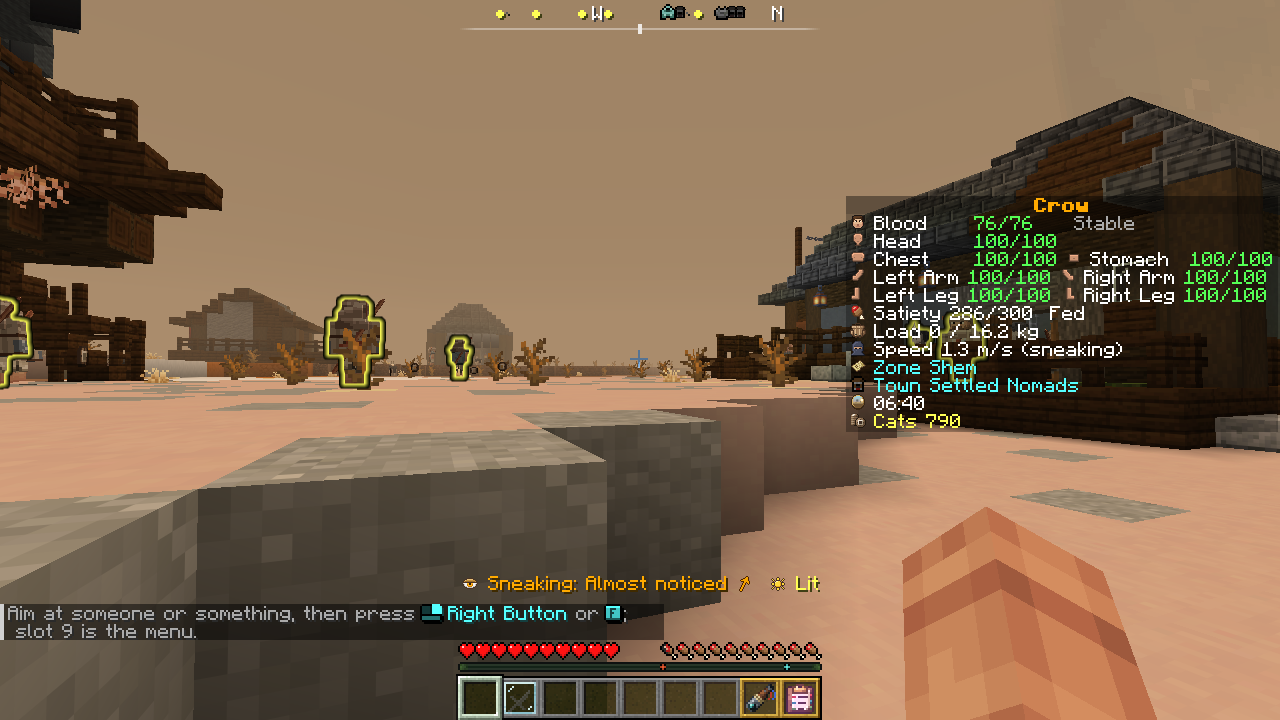
| Position | What it shows | Example |
|---|---|---|
| Scoreboard on the right | Your body, satiety, load, location, cats, bounty | Blood 76/76 Stable |
| Small text in the middle of the screen | What just happened to you, key point only | Being looted, Marched in chains |
| Very top of the screen | Compass: direction, places you know, destination | West, the Hub |
| Bars under the compass | Things with a countdown or progress | Picking the lock - Time left, You Died! |
| Action bar (above the hotbar) | Control hints that are not urgent, sneak state | Sneaking: Unnoticed |
| Chat | Full sentences, what others say to you, distant events | [Sighted] About 70 blocks northeast: … |
| Nameplate above the head | Who they are, what they are doing, whether they will attack you | Patrolling to the town gate |
| Frames on the ground | Whether you should leave this ground or stay on it | Red frame, green frame |
| Holding Tab | Location, squad, bounty, and the threat level of the town you are in | Threat Level · The Hub · III (85/100) |
The scoreboard
Link to the “The scoreboard” sectionIn Full mode, from top to bottom:
- Character name.
- Blood: current/maximum, followed by “Bleeding X/s” or “Stable”. For a Skeleton this row is called Oil.
- Seven body parts: Head; Chest, Stomach; Left Arm, Right Arm; Left Leg, Right Leg. Each cell shows current/maximum, “severed” when the limb is gone, and “prosthetic” when a prosthetic is fitted. A cell flashes while the stump is still bleeding or the wound is getting worse.
- Satiety: N/300 plus a status word. Skeletons do not eat, and the row says “Skeletons don’t need to eat”.
- Load: kilograms carried/kilograms you can carry.
- Speed: metres per second, with walking, running, sneaking, crawling, or standing still in brackets.
- Zone, with a Town row below it while you are in a town; inside your own outpost it reads “At X’s Outpost”.
- Disguise, Looks like a slave: appear only when they apply, with how strong they are in tenths. The Disguise row starts with a small icon: while disguised it is a bone-coloured hooded dustcoat; once you are seen through it changes to the one with the hood pulled down, the face showing and a red lining, and the row then shows the seconds left in red. The Looks like a slave row starts with a small icon of iron shackles (two iron rings and a hanging length of chain); the icon stays the same while the number after it changes colour with the strength. The compact scoreboard shows it as the shackles icon followed by “37%”. If the resource pack lacks these pictures, only the text is shown.
- Time of day, followed by the weather or hazard in the area when there is one: dense fog, sandstorm (with the direction it blows), gas, acid rain, beams of light, thunderstorm, rain. The kind that does not harm you is marked “(immune)”.
- Cats.
- Bounty: appears only when you have one, with the amount, which side issued it, and how long is left or “never fades”.
The colour of a number shows how good or bad things are: green is three quarters or more, yellow is four tenths or more, gold is nearly empty, and red is zero or worse. The satiety status words: Fed is white, Hungry turns yellow, Malnourished turns gold, and Starving turns red. Load turns yellow as soon as it passes the limit and red when it is far over.
Three modes
Link to the “Three modes” sectionSwitch between them under Scoreboard… in Settings. Each character stores their own choice:
- Full: as above, every row with its name and status.
- Compact: only icons and numbers, with units shortened to kg and m/s. After 5 seconds with the whole body intact the body-part section folds away, and it unfolds the moment you are hurt. The time and any harmful weather move to the top row, and the time turns red during such weather. The bounty shows only the abbreviations of the sides that issued it plus the total, for example “HN·UC12,500”, listing two sides at most. The disguise shows as the hood icon plus “66%”.
- Hidden: the whole block is not shown. The reminders for bleeding and worsening wounds appear in the middle of the screen instead.
Holding Tab
Link to the “Holding Tab” sectionHolding Tab brings up a list. At the top is the DustMoon banner, and below it come your location, your squad, your party when you are in one, and your bounty. The banner covers the 2nd to 4th countdown bars at the top of the screen, so while you hold Tab those bars don’t overlap the text of the list.
Location. In a town it shows the town’s name; when something has happened to the town, a status follows the name in red:
- “Unguarded (N min left)”: for 60 minutes after the defending army has been beaten back, the town has no garrison.
- “Anarchy (N min left)”: if both apply, only this one is shown.
- “Looted Ruins”: after the anarchy ends.
The minutes are real time, and part of a minute counts as a whole one.
Threat level. When you carry a bounty and are inside a town’s area, a red line appears under the Bounty heading: Threat Level, the town’s name, and the level, for example the Hub III (85/100). That means you have knocked down 85 people in this town, and the next level comes at 100. The top level, V, has no next level and reads just “V (132)”. Only the town you are in right now is shown; outside every town’s area, when that town’s level is 0, or without a bounty, the line isn’t there. For every part of the Tab list in full, see HUD, Messages and Scoreboard.
The small text in the middle of the screen
Link to the “The small text in the middle of the screen” sectionThis is where things that just happened to you are written: a lock that would not open, food you could not eat, a skill that went up, being looted. When the sentence is too long only the key point is kept, and the full sentence is written into chat at the same time with “[Status]” in front. When the same sentence keeps repeating, chat records it only once to avoid flooding.
Major events such as “You Are Unconscious!” use a large title. The small text is held back meanwhile and appears after the title is gone.
Top of the screen: compass and countdown bars
Link to the “Top of the screen: compass and countdown bars” sectionThe top strip is the compass. The directions slide as you turn your head. Towns, villages, and ruins you know are marked with the same icons as on the World Map: places you have only heard of are grey, unknown places are not drawn, and the nearer a place is the larger its icon.

When a destination is set, the compass marks its direction and distance. The compass is not visible while the World Map is open. The compass needs the resource pack to be seen.
Under the compass are the countdown bars. Everything with a countdown or progress goes here, such as how long until you wake from unconsciousness, lockpicking, where you are being carried, a town guard ordering you to halt, the grace period for trespassing, the response time for chat options, and sieges. Up to three bars are stacked at once, with the most urgent on top, and a bar disappears when the matter is over.
Action bar and chat
Link to the “Action bar and chat” sectionThe action bar sits right above the hotbar and holds faint control hints (see Controls). While you crouch and sneak, the action bar states whether you have been seen: Unnoticed, Unnoticed (someone near), Almost noticed, Noticed.
Chat shows full sentences:
- [Status]: the full version of the key point in the middle of the screen.
- [Sighted]: things that really happen in the distance and that you can see from where you stand, with direction, distance, and who did what to whom. Click the line and the people involved glow for a few seconds (only you see it), and your view turns that way.
- What others say to you: X says to you: “…”.
- Options that need your decision: one option per line; it only counts once you click.
- Added to journal: something new you saw has been recorded.
Nameplates and frames on the ground
Link to the “Nameplates and frames on the ground” sectionPeople whose name is red attack you on their own initiative or are fighting you now. White ones do not attack. The downed and corpses are grey.
The small text after a name tells you what can be done with that person: (Bar) and (Weapon Shop) can trade, (recruitable) can be hired, (lootable) has things you can take, and (Bounty) can be knocked out, carried to a town guard, and handed in for the reward. When your crosshair is on a person, their nameplate expands and adds blood, satiety, and what they are doing. Details are in Nameplates and Skeleton Eye Scope.
A red frame on the ground means you should leave: other people’s homes and outposts, shops that have closed for the night, territory or towns where your race is not welcome, and the building that has just released you from jail. A green frame means you should stay: a slave work site, or the area you follow within while being escorted.
The reason is written in the middle of the screen. When there is a grace period, there is also a countdown at the top. When you walk out, it says you have left. For the consequences, see Trespassing.
The inventory (E) is also the status sheet
Link to the “The inventory (E) is also the status sheet” section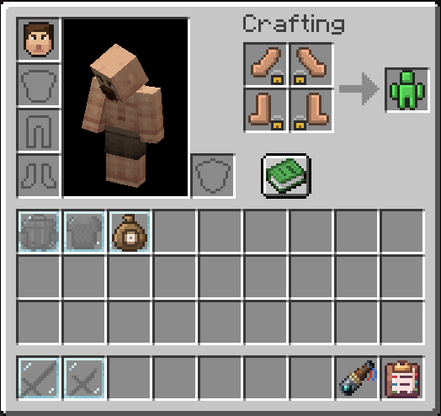
- Prosthetic slots for the four limbs: the usual 2×2 crafting grid is replaced by the four limbs: top left the Left Arm, top right the Right Arm, bottom left the Left Leg, bottom right the Right Leg, matching your own left and right. When a limb is gone, put a prosthetic in that cell and it is fitted.
- Body status: the name of the cell to the right of the arrow reads “Now: …”. Hover over it for up to three lines of “status: what to do”, most urgent first, for example bleeding and that it needs bandaging. When nothing is wrong it reads that the current state is normal.
- Fixed slots: the first three cells of the inventory’s first row are Backpack, Shirt, and Money Pouch. Cats in the Money Pouch are not taken when you are looted, are shared by the whole squad, and can be taken out with one click. Details are in Cats and Money Pouch.
Damage numbers
Link to the “Damage numbers” sectionWhen something is hit, a number pops up above it: white is your hit, bold gold is a technique, and small pale grey is a hit by someone else. Hits on the same target in very quick succession are merged into one total. By default you see only your own; under Preferences… this can be changed to all or off.
| Scoreboard row | When it is there | How the colour changes |
|---|---|---|
| Blood (Oil) | Always | Same thresholds as the body parts |
| Seven body parts | Always (folded away in Compact mode while the whole body is intact) | Green ≥75%, yellow ≥40%, gold >0, red ≤0 |
| Satiety | Races that eat | Fed white, Hungry yellow, Malnourished gold, Starving red |
| Load | Always | Yellow over the limit, red far over |
| Speed | Always | Same colour as Load |
| Zone, Town | Always; Town only inside a town | Light blue |
| Disguise, Looks like a slave | When disguised, when an escaped slave | Changes with the strength in tenths |
| Time of day and weather | Always; weather only when there is some | Weather you are immune to is marked “(immune)” |
| Cats | Always | Yellow |
| Bounty | When you have a bounty | Red |
| Situation | Number | Notes |
|---|---|---|
| The longest the small text in the middle of the screen gets | About 8 Chinese characters | Longer text is cut to the key point; the full sentence goes to chat |
| How soon the same [Status] line can show again | 30 seconds | If it keeps repeating, it keeps staying away |
| How many [Status] lines per minute at most | 8 | |
| When Compact mode folds away the body parts | After 5 seconds with the whole body unhurt | Unfolds at once when any part is hurt |
| How many countdown bars at once | Up to 3 | The most urgent first |
| How many landmarks the compass shows | Up to 5 | The destination is counted separately |
| How far away events are reported with [Sighted] | 48–96 blocks | Anything nearer you can see for yourself |
| How often [Sighted] reports come | At most 6 lines a minute | The same kind of event isn’t reported again within 120 seconds |
| How long the marker stays after clicking [Sighted] | 8 seconds | Ends early if you walk away or it’s over |
| How close together hits on the same target merge into one damage number | Within 0.5 seconds |
See also
Link to the “See also” sectionOfficial siteHow to joinWorld mapFAQ
DustMoon.net is not an official product of Mojang Studios or Microsoft, and is not approved or endorsed by them.
DustMoon is inspired by the world of Kenshi and is not affiliated with Lo-Fi Games.
© 2026 DustMoon.net