
Journal
The Journal is a record that only grows: the first time you see, hear of, read, enter, obtain, kill, or live through something, it is written down. Sell the item, throw it away, leave the place, and the record is still there. Taking your own life to start over doesn’t clear it either. Only what you come across yourself is recorded. What a squadmate sees doesn’t count as yours.
How to open it
Link to the “How to open it” sectionJournal in the slot 9 Game Menu. It only appears after you have your first record.
When there is a new record, the slot 9 icon glows until you open the Journal.
In the chat line “Added to journal: X”, the name can be clicked. Hover over it and “Click to open the Journal” appears. Click, and the Journal opens straight to that entry.
When opened, it shows the tab and category of your newest record.
How to read the layout
Link to the “How to read the layout” sectionFrom top to bottom:
- The total, written “Collected N/N”.
- The tab row: Creatures, Places, Weather, Items, Books, People, Ordeals, and Starts as the last button.
- The count for this tab. Tabs with stages split it up, for example “People 42/164 (Heard of 30, Seen 9, Killed 3)”.
- The category row.
- The icon grid, 20 to a row.
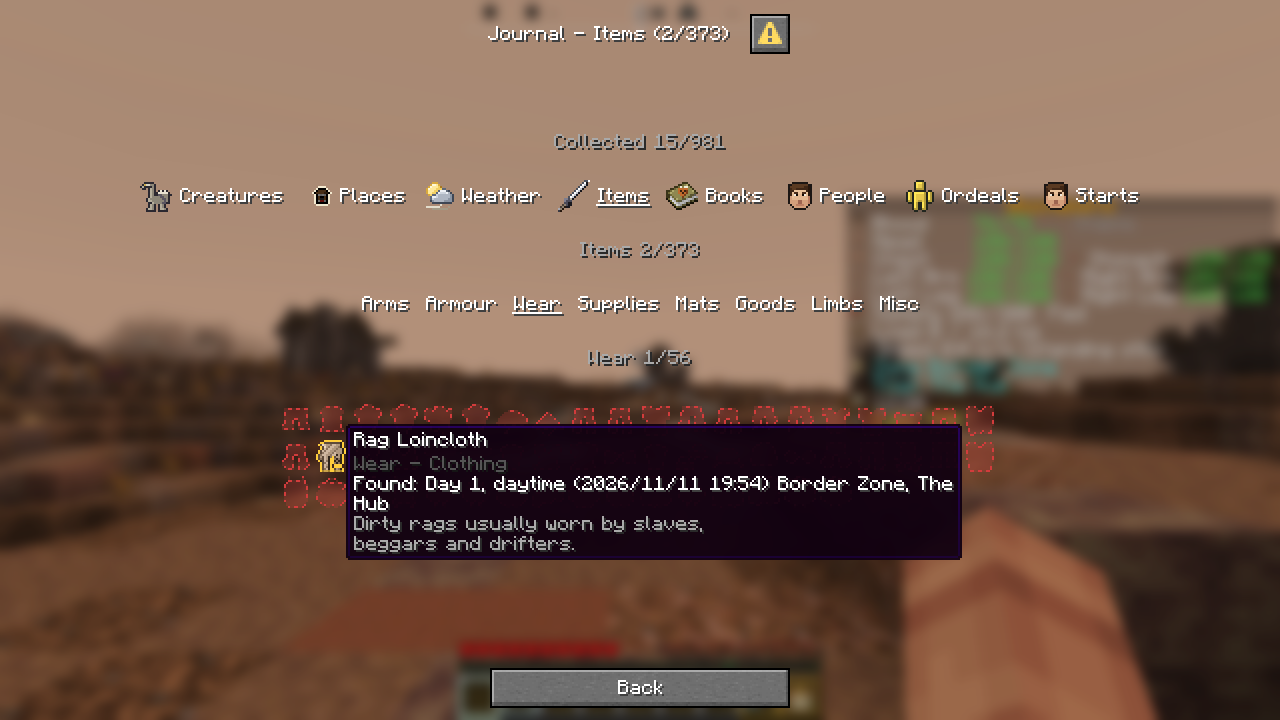
The total leaves out entries that can’t be obtained at the moment, so the count can reach 100%. For what each tab collects, see Journal Tabs and Entries.
The four looks of an icon
Link to the “The four looks of an icon” section| Look | Meaning |
|---|---|
| Red dashed outline | Not discovered yet |
| Greyscale | First stage reached |
| Full colour | A middle stage reached |
| Bright frame | Highest stage reached |
The description of an outline has one extra line with a hint on how to get it, such as where it is sold, which zone it roams, or where it is. It names two places at most, joined with “or”.
Stages: from heard of to killed
Link to the “Stages: from heard of to killed” sectionOne entry can have several stages. A higher stage covers the lower ones, and the entry is counted once. Common sets:
- People: Heard of, Seen, Talked with. For bounty targets: Read, Seen, Killed.
- Creatures: Heard of, Seen, Killed, or Seen only.
- Places: Heard of, Visited; or Heard of, Entered, Searched.
- Books: Obtained, Read.
- Items: Obtained only.
- Hazards: Seen, Endured.
Hover over an icon to read its name, its category, and the time each stage was reached. The time is written “Day N, hour N after arrival” with the real-world date, along with the place, the weather at the time, and who was with you.
Creatures and factions have an itemised “Habits: N/N” list. The ones you have watched are marked “(observed)”. Creatures also have “May drop:” and a “Kills: N” line.
Towns and ruins list “May meet:” and “Passing through:”. Places where nobody lives say “Nobody lives here”.
How things get recorded
Link to the “How things get recorded” section- Seen: people and creatures within 48 blocks that you can actually see. They are recorded within about 5 seconds of being seen. While you hold up the Skeleton Eye Scope and aim it, this distance is tripled. See Nameplates and Skeleton Eye Scope.
- Obtained: things in your inventory. Items that came from someone else don’t count as obtained by you.
- Heard of: names of people and places mentioned in dialogue and books.
- Entered: you have to walk into the town yourself. Being carried, escorted, or locked up doesn’t count.
- Killed: the kill has to come from your side. You, your squad members, your pets, or mercenaries killing for you all count.
Notices for new records
Link to the “Notices for new records” sectionA line appears in chat: “Added to journal: X - “ followed by the item that was just added. New records within 10 seconds are merged into one line, up to 8 per line.
Each record plays one short experience sound. The rustle of pages plays at most once every 60 seconds.
The grey “Highlight” after the name can be clicked: that target glows for you alone for 10 seconds and your view turns smoothly towards it, so you can find it again. The view only turns when the target is within the area your screen has loaded; a link that points to a place turns your view too. After 15 minutes the line can no longer be clicked. When it can’t be clicked, the screen says why, for example that the target is no longer here or is too far away.
Where to see what became of important people
Link to the “Where to see what became of important people” sectionThe Journal has no Diplomacy tab. What became of important people, what that means for your outpost, which factions you are on bad terms with, and whom you can ask to mediate are all under Faction Relations in the hotbar slot 9 menu; see Faction Relations. The chat line “X is dead (consequences: N)” opens that page when clicked.
Kill counts
Link to the “Kill counts” sectionEach kind of creature, each person, and each faction is counted separately. At the 10th, 50th, 100th, 200th, 500th, and 1,000th kill, a line appears in chat. After that, one line for every further 1,000.
Unlocking starts
Link to the “Unlocking starts” sectionOn the Starts tab, a start counts as unlocked once any character on your account has met its conditions. Progress towards the conditions is counted from what your current character has recorded. For the starts themselves, see Getting Started.
| Situation | Number | Notes |
|---|---|---|
| How soon something is recorded after you see or get it | Within about 5 seconds | |
| How close counts as “seen” | Within 48 blocks | 3 times as far while aiming the Skeleton Eye Scope |
| How new-record notices are merged | Up to 8 within 10 seconds share one line | The rest go on the next line |
| How the new-record sound is merged | One sound per half second | |
| How often the page sound plays | Once per 60 seconds at most | |
| How long the subject glows when you click a new record in chat | 10 seconds | The line can be clicked for 15 minutes |
| Icons per row | 20 | 10 entries per page in the text list |
| How many lines show when you hover an entry | 9 normally | Up to 20 when there’s a habits list |
| At which kill counts you get a notice | 10, 50, 100, 200, 500, 1,000 | Then every further 1,000 |
See also
Link to the “See also” sectionOfficial siteHow to joinWorld mapFAQ
DustMoon.net is not an official product of Mojang Studios or Microsoft, and is not approved or endorsed by them.
DustMoon is inspired by the world of Kenshi and is not affiliated with Lo-Fi Games.
© 2026 DustMoon.net