
Trading and Dropped Items
When giving items to another traveller, use the trade window instead of dropping them on the ground. A trade completes only when both sides have pressed Confirm, and if either side changes anything after confirming, both confirms are cleared. Items dropped on the ground have pickup protection, and other travellers need your permission to pick them up.
Trading face to face
Link to the “Trading face to face” sectionOpen the interaction menu on another traveller and choose Trade. A [Trade] request, “X wants to trade”, appears in their chat with two buttons, Agree and Decline. If they don’t answer within 30 seconds, the screen reads “X did not answer the trade”. If they are trading with someone else, the screen says so directly.
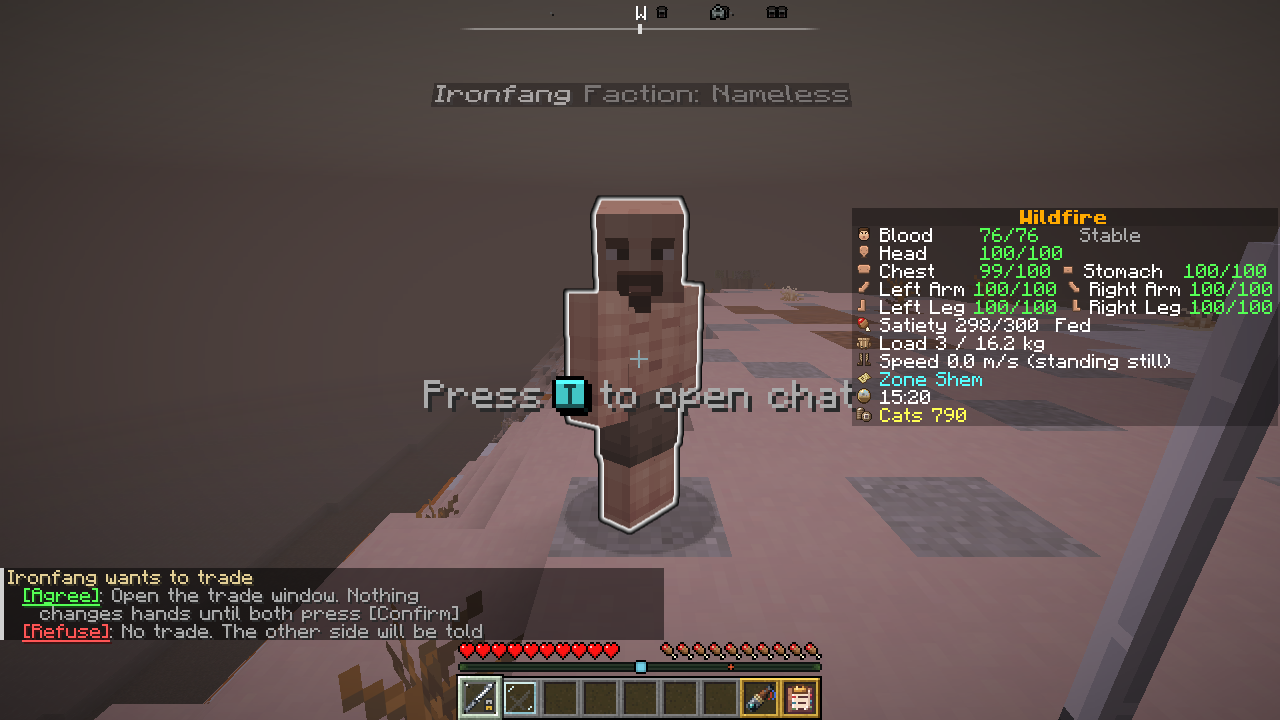
When they agree, the two of you have to be within 6 blocks of each other. Otherwise the trade is cancelled, with the reason shown as “too far apart”. A trade works whether they are standing or downed.
The trade window
Link to the “The trade window” sectionThe window is titled “Trade with X - click to offer”. If the name is too long to fit, it reads just “Trade with X”. The window has 6 rows:
- The 4 columns on the left hold the items you are giving, up to 24 slots.
- The 4 columns on the right show the items they are giving. You can only look.
- The middle column, from top to bottom: your cats, your Confirm, two help slots, their cats, their confirm state. Hovering over a help slot shows “Click an item in the inventory below to offer the whole stack” and “Click an offered item on the left to take it back. The right side is the other offer”.
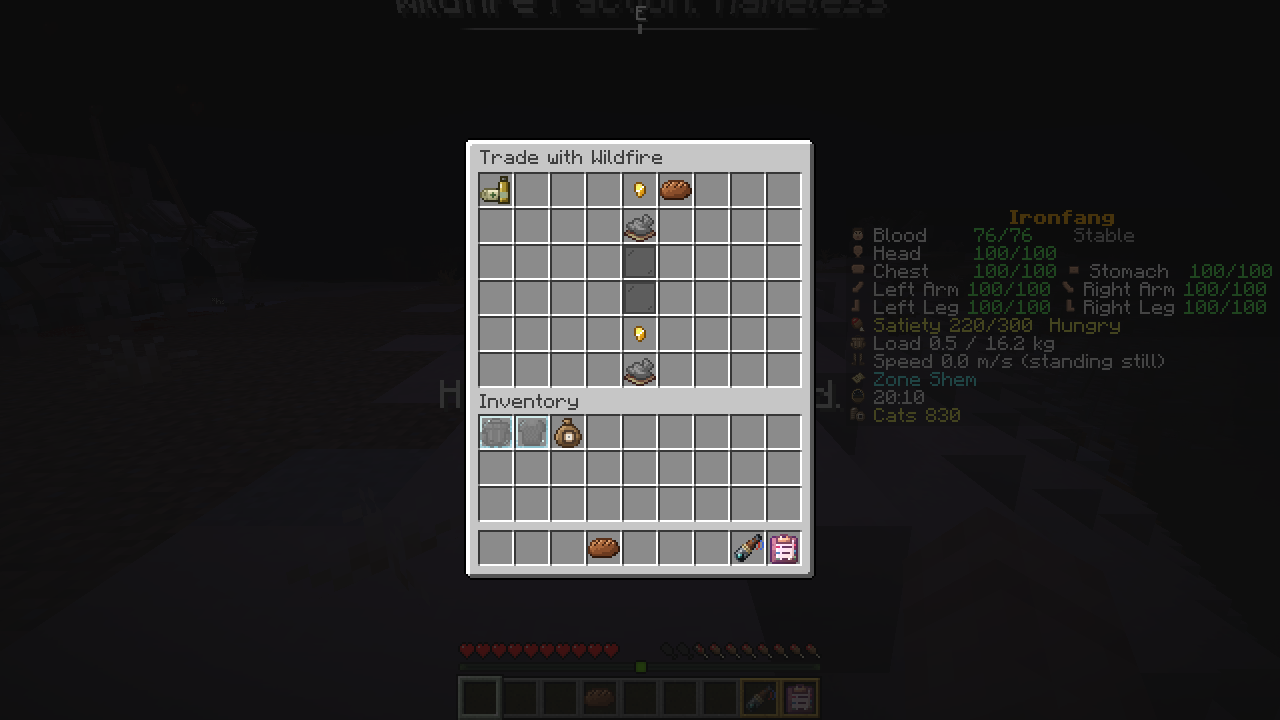
Clicking a slot in your own inventory puts the whole stack into the trade. Clicking a slot on the left that you filled takes the item back. The cats button adds 10 on left-click and takes back 10 on right-click. Holding Shift changes it by 100 at a time. The amount can’t go above the cats you are carrying.
Conditions for the deal
Link to the “Conditions for the deal” sectionNothing changes hands until both sides press Confirm. When either side puts in or takes out an item, or changes the cats, both confirms are cleared and have to be pressed again. So nobody can swap an item unnoticed after confirming. The deal is checked once more as it completes: both sides online, within 6 blocks, and with enough cats.
After the deal, items that don’t fit in your inventory aren’t dropped on the ground. They are held for you and handed over when your inventory has space.
Cancelling
Link to the “Cancelling” sectionThe trade is cancelled and each side’s items are returned in any of these cases:
- Either side closes the window.
- Either side goes offline.
- The two sides are more than 6 blocks apart.
The screen reads “Trade cancelled” with the reason.
Items that can’t be traded
Link to the “Items that can’t be traded” sectionSome items can’t be passed to others. The reason is shown when you put them into the trade:
| Item | The screen reads |
|---|---|
| Gear that is bound | Bound gear can only be worn or carried by X. Unbind it before handing it over. |
| Character-bound items (leaders’ spoils and the like) | X is bound to this character and can’t be given to another character. |
| Starting gear | Starting gear belongs to its character and can’t be put where others can take it |
| The menu in hotbar slot 9, race appearance pieces, shackles | X cannot be traded |
For the kinds of binding, see Bound Gear and Your Own Story.
Relics limited in number across the whole world (AI Core, Ancient Science Book, Engineering Research) can be traded, but they carry a mark: the character name of the first person to obtain it is permanently attached after the item name, in the form “Item name (character name)”. Trading, dropping, dying, or selling to a shop doesn’t change this mark. One-per-person books and maps can be given to others, but only the person who first obtained them can sell them. See Unsellable and Not-for-sale Items.
Items dropped on the ground
Link to the “Items dropped on the ground” sectionWhen you press the drop key or drag an item out of the window, the item falls to the ground and has pickup protection.
When another traveller tries to pick it up, the screen reads “This item is pickup-protected. Asked X for permission. It can be picked up once X is over 128 blocks away or offline”.
The person who dropped the item receives a [Pick Up] request, “X wants to pick up the dropped items. Allow?”, with two buttons, Allow and Decline. A line of advice below says that to exchange items you can use Trade instead.
- Press Allow: for 60 seconds they can pick up items you dropped, and they can also loot spoils that belong to your party.
- Press Decline, or don’t answer within 30 seconds: they have to wait until you have gone far away or offline before picking it up. The same person doesn’t send another request within 30 seconds.
- Members of your party can pick it up at any time without asking.
When protection is released
Link to the “When protection is released” sectionPickup protection is released automatically when any of the conditions below is met. After that anyone can pick the item up, and the protection doesn’t come back:
- You and all your party members go offline.
- All of you move more than 128 blocks away.
- All of you are downed, with no squad member standing nearby.
These three conditions are the same as those for releasing a claim in Parties and Loot Claims. The difference is timing: an item on the ground is released the moment a condition is met, while a loot claim waits for 2 minutes in a row. Residents picking up items aren’t bound by this limit.
Items you didn’t drop yourself
Link to the “Items you didn’t drop yourself” sectionItems that fell because you couldn’t carry or wear them, and your severed limbs, can only be picked back up by you. When others try to pick them up, the screen reads “This fell off X. Only X can pick it back up”. There is no Allow option for these items. Items that fell from a traveller’s body can’t be picked up by other travellers. Only residents take them.
Two people in the same chest
Link to the “Two people in the same chest” sectionWhen two travellers have the same barrel or chest open and grab the same slot at the same moment, only the first one gets it, and the item doesn’t turn into two. The slot goes empty for the one who was later, and the screen reads “X just took the [Bread]”, with the item’s name in the brackets.
| Situation | Number | Notes |
|---|---|---|
| How long the other person has to answer a trade or pickup request | 30 seconds | No answer counts as no |
| How close you must stand to trade | Within 6 blocks | Both when agreeing and when the deal goes through |
| How many slots each side can put on the table | 24 | 4 columns × 6 rows on the left |
| How many cats each click adds or removes | 10 | 100 while holding Shift; you can’t offer more than you carry |
| How long you have to pick up or loot after someone presses Allow | 60 seconds | After that you have to ask again |
| How soon you can ask the same person again after a no or no answer | 30 seconds | |
| When items on the ground stop being protected | When the whole party that dropped them is beyond 128 blocks | Released at once, with no wait |
| Two people grabbing the same slot in a container | Within 1.5 seconds, the second one gets nothing | They see “X just took the [item]” |
See also
Link to the “See also” sectionOfficial siteHow to joinWorld mapFAQ
DustMoon.net is not an official product of Mojang Studios or Microsoft, and is not approved or endorsed by them.
DustMoon is inspired by the world of Kenshi and is not affiliated with Lo-Fi Games.
© 2026 DustMoon.net