
Switching Members
Switching squad member means changing bodies, not changing views. You take over that squad member’s appearance, gear, inventory, blood, injuries, skills, prosthetics, and name. Your original character stays where it is and becomes a squad member acting on orders. Switch again, and the previous one keeps their gear and state as they were while you move onto the next.
Who to switch to
Link to the “Who to switch to” sectionOpen the Switch Squad Member page in hotbar slot 9. Your squad members are listed one per row, with how far they are from you. Click one to switch over, and the screen reads “Switched to X”. In the player list your name changes to the character name with the account in brackets, so others can tell who is in control.
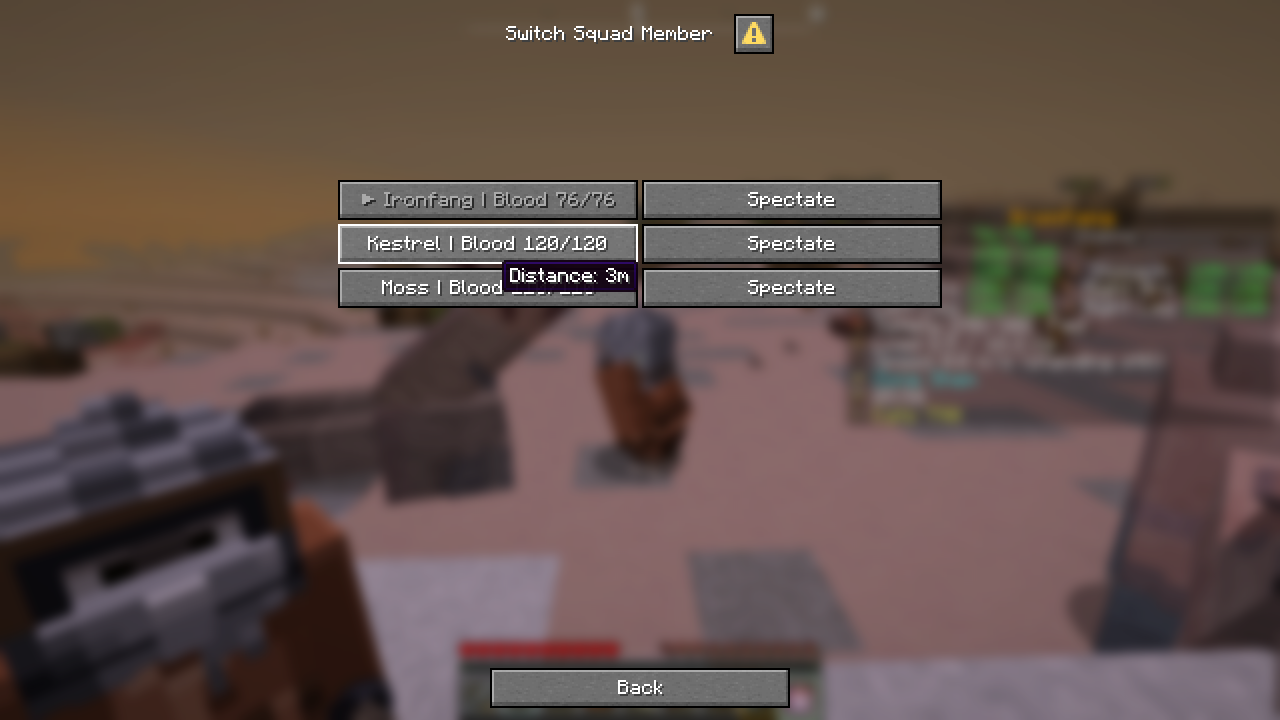
Whatever state a squad member is in is written on their button, for example “Bonedog | Down”: Down, Being carried, Captured, Carrying someone, Climbing, or Respawning. These rows can be pressed all the same. Switch into someone unconscious and you carry on lying there, with the countdown to waking still running; switch into someone playing dead and they get up by themselves. While you are in Auto Mode, each row’s description reads “Click to end Auto Mode and act as X, distance: N”.
The menus you open while unconscious or dead also have Switch Squad Member at the top, including while you are being carried, being executed, or locked up.
After switching:
- Their inventory becomes your inventory. Whatever doesn’t fit in the inventory is kept on the character first, and goes back into the inventory automatically, checked every second, as soon as a slot frees up; nothing is dropped on the ground, and it only falls out if you die. Switching back to your own character works the same way, with no inventory check.
- Their bounty is yours too. Whoever has marked them has marked you.
- The person picked under Give Orders Individually is cleared.
Animal characters can switch too: with a humanoid squad member, switch into them to use human hands to build an outpost, place work blocks, and craft, while the animal body stays behind and follows the squad. Press Back to X to switch back; if the animal dies, you can’t switch back. See Playing as an Animal.
Who you can’t switch to
Link to the “Who you can’t switch to” sectionOnly three kinds can’t be switched to because of who they are. Their names are grey on the list:
| Grey text | Meaning |
|---|---|
| Animals can’t be switched to | Animals can’t serve as a body |
| Contract mercenary | Mercenaries on a timed contract only follow orders. See Mercenary Contracts |
| Race not playable | This one’s race can’t serve as your body |
Unique characters can be switched to as usual.
Things are tidied up before the switch
Link to the “Things are tidied up before the switch” sectionNothing you are doing stops a switch. Being carried, carrying someone, tied up, locked up, captured, on fire, falling, in water, riding, holding an item on the cursor, someone coming to deal with you, being in Auto Mode, having belongings held, being executed, or respawning: press it and the switch goes ahead. These are taken care of first:
- The item on the cursor goes back into the inventory, or onto the ground at your feet if it doesn’t fit: “The held item didn’t fit in the inventory and was put on the ground here”.
- You get off any mount and put down whoever is on your shoulder.
- Auto Mode ends and you are returned to your place before the switch carries on: “Ending Auto Mode. The switch continues right after”, waiting up to 30 seconds.
- If you are being taken out of a cell for a beating, the switch waits until you are locked back in: “Being taken out of the cell. The switch continues once locked back in”.
- If you are being carried, the trip passes to the body left behind; on a town guard’s trip, the same guard carries that body on to the police station.
- The same lock on a cage or prisoner pole is moved onto the body left behind. Switch into a squad member who is locked up and you are held in the same spot, for the same sentence.
When a switch still can’t happen
Link to the “When a switch still can’t happen” sectionOnly a few things it simply can’t do stop you: the feature isn’t open (“Squad member switching isn’t available in this build”), the previous switch is still going through, or less than 1 second has passed since the last one.
If something goes wrong partway, the screen gives the real reason and not a single item moves, for example:
- “X’s body can’t be placed here. No switch, nothing was moved”
- “X is too far away. Get closer, then switch”
- “X is still on the way over. Try again in a moment”
- “An animal body can only be swapped for a humanoid squad member while riding it. No switch”
- “Still not ready after 30 seconds, so no switch happened. Items unchanged”
What the character you left does
Link to the “What the character you left does” sectionAfter you switch away, your original character is an ordinary squad member:
- If you gave an order, they act on it.
- With no order, within about 48 blocks of you they follow you. Further away, they wait where they are.
They are still a real person in the world. They can be looted, attacked, and possibly captured.
They are also still your own permanent squad member: never treated as an enemy, with no “(diplomat)” on the nameplate, and no “(lootable)” when they are down; take things from them through the Squad page. The change in maximum blood when bodies are swapped doesn’t count as an injury.
Spectating
Link to the “Spectating” sectionSpectate only watches a squad member without taking over. Your character stays where it is, and your view goes to watch them. Before spectating you can set what your character does meanwhile: Guard, Wait Here, or Keep Working.
You can spectate while locked up too, but what you can see is limited. If the other is too far from you, no view opens, and you are only told which direction they are in and about how many blocks away. Someone escorting you only waits for you for a short while, so watch for the notices while spectating. When they stop waiting, you are left behind and have to end spectating at once and keep up.
When something goes wrong
Link to the “When something goes wrong” section- The character you left is killed: they wake at your respawn point, still the same character, but with empty hands.
- The character you left is put in prison: the screen tells you who locked them up.
- The squad member you are controlling dies: as long as you still have a living character, Respawn doesn’t appear. Instead there is Switch Squad Member, or Spectate and Wait, which spectates yourself and switches back automatically once you can move.
- The squad member you are controlling leaves the squad (dismissed, contract ended): you return to your own body.
- You can’t dismiss yourself.
| Situation | Number | Notes |
|---|---|---|
| How soon you can switch again after switching | About 1 second | |
| Where items go that don’t fit in your inventory after switching | They stay on the character for now | Put back each second once a slot is free |
| How long it waits for Auto Mode to end | Up to 30 seconds | If it doesn’t, no switch happens and items stay as they are |
| How far the character you left follows you | Within about 48 blocks | Further away, they wait where they are |
See also
Link to the “See also” sectionOfficial siteHow to joinWorld mapFAQ
DustMoon.net is not an official product of Mojang Studios or Microsoft, and is not approved or endorsed by them.
DustMoon is inspired by the world of Kenshi and is not affiliated with Lo-Fi Games.
© 2026 DustMoon.net