
Orders and Behaviour
Squad members act only on the orders you give. When you give none, they act on their own judgement. There are two places to give orders: the Squad page for commanding the whole squad and setting the details, and pressing Use on a squad member for commanding one person. There are also seven kinds of conduct that set how they act in a fight.
Two places to give orders
Link to the “Two places to give orders” sectionThe Squad page (hotbar slot 9) lists each squad member’s blood and state. The page has two whole-squad orders:
- Everyone Follow Me: all squad members follow together. The result is written at the top of the page, for example “3 squad members are following”.
- Whole Squad: Wait Here: all squad members who are standing stop where they are, contract mercenaries included. The result is written at the top of the page, for example “3 squad members are waiting”; anyone who is down or didn’t stop is listed one by one too.
When you order the whole squad, members who are playing dead are woken first and then follow the order.
The page also has a row for you yourself, marked “(own body)” after the name. When there are enough members to need more than one page, the tabs at the top stay put. Even while you are unconscious, you can open a squad member’s card to look at it.
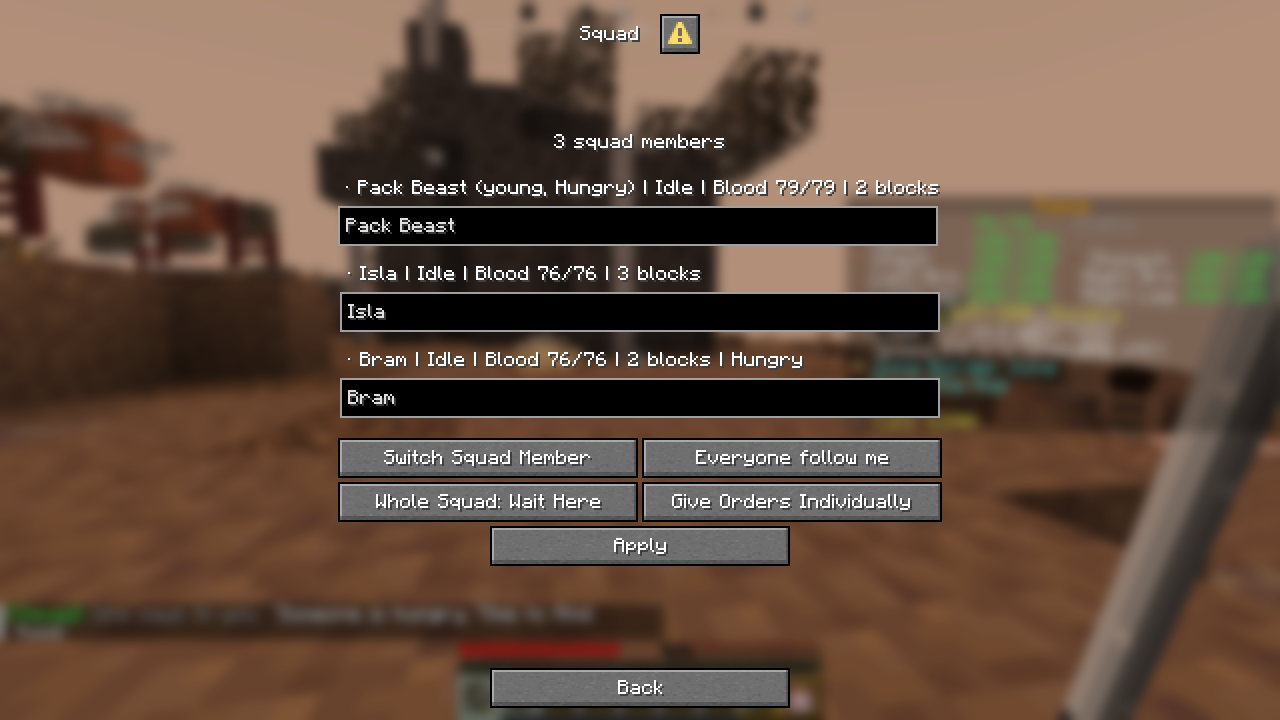
After you pick a squad member, the page gains buttons for that person. Each squad member also has a dropdown beside them where you can choose Call to My Side: they hurry to you along the real route with a countdown on screen, and if they haven’t arrived when time runs out, they appear beside you. It is cancelled if they are hit, tied up, downed, or get into a fight on the way. After choosing, press Confirm.
Pressing Use on a squad member opens the interaction menu. Besides talking, it has Wait Here, Order to Move, Order to Attack, Inventory, Job List, and Dismiss. To see their skills, click View skills, the last line of the name card at the top of the menu. Inventory lets you take and place items for them directly. While a squad member is playing dead, the menu gains Wake: “Get the squad member up”, and pressing it shows “X got up”.
Inside an outpost, the Jobs page on the main screen has Pick a Member to choose someone and see their job list; the page also reminds you “To have a member tend the research bench: [Research] page → [Assign a Squad Member]”. With no one to assign, it tells you “No squad members available: taverns have mercenaries for hire (marked “recruitable”), and some people on the road want to join”.
Individual orders
Link to the “Individual orders” section| Order | What they do |
|---|---|
| Guard Me | Stays at your side and fights with you when enemies come; their attacks don’t bring you a bounty, and they don’t go looting |
| Follow Me | Only follows; fights on their own judgement as usual |
| Wait Here | Stays put until you give another order; hits back when attacked, walks back afterwards, and stands where they are if they can’t get back |
| Order to Move | Walks to the spot you point at and waits there after arriving |
| Order to Attack | Attacks the target you point at and holds the grudge for about 1 minute |
| Dismiss | Leaves the squad; can be recruited again later |
Order to Move and Order to Attack need you to point once more: after choosing, the action bar tells you to left-click to pick a spot or to pick a target, and you have about 15 seconds to aim at the ground or the target and click. Press left Shift to cancel. Both spot and target have to be within about 64 blocks of you. Anything further doesn’t count.
A squad member who hasn’t arrived after walking for about 1 minute gives up and tells you why, for example being attacked all the way, taking too long, or being unable to climb past something on the route. Getting within about 2 blocks of the destination counts as arriving.
You can also send a squad member to go with someone else: the menu has versions of Guard and Follow aimed at the other person, and the squad member moves with that person.
When an order doesn’t go through
Link to the “When an order doesn’t go through” sectionWhen an order is refused, the screen gives the reason:
- They aren’t your squad member, or they are already down and can’t hear.
- They are busy with something else at the moment (being escorted, being carried off, going through a pack).
- They are too far from you, or you didn’t point at a spot or a person at all.
- They are in shackles: ransom them or undo the shackles first, and then they take orders.
- They are locked up: let them out first.
- They are a mercenary: they only take Follow Me and Wait Here. See Mercenary Contracts.
- A crossbow user doesn’t aim at a diplomat, unless the diplomat attacks first.
Seven kinds of conduct
Link to the “Seven kinds of conduct” sectionOn the Squad page, pick a person, go into Conduct, and switch them one at a time. Each squad member has their own set. By default only Jobs and Ranged are on.
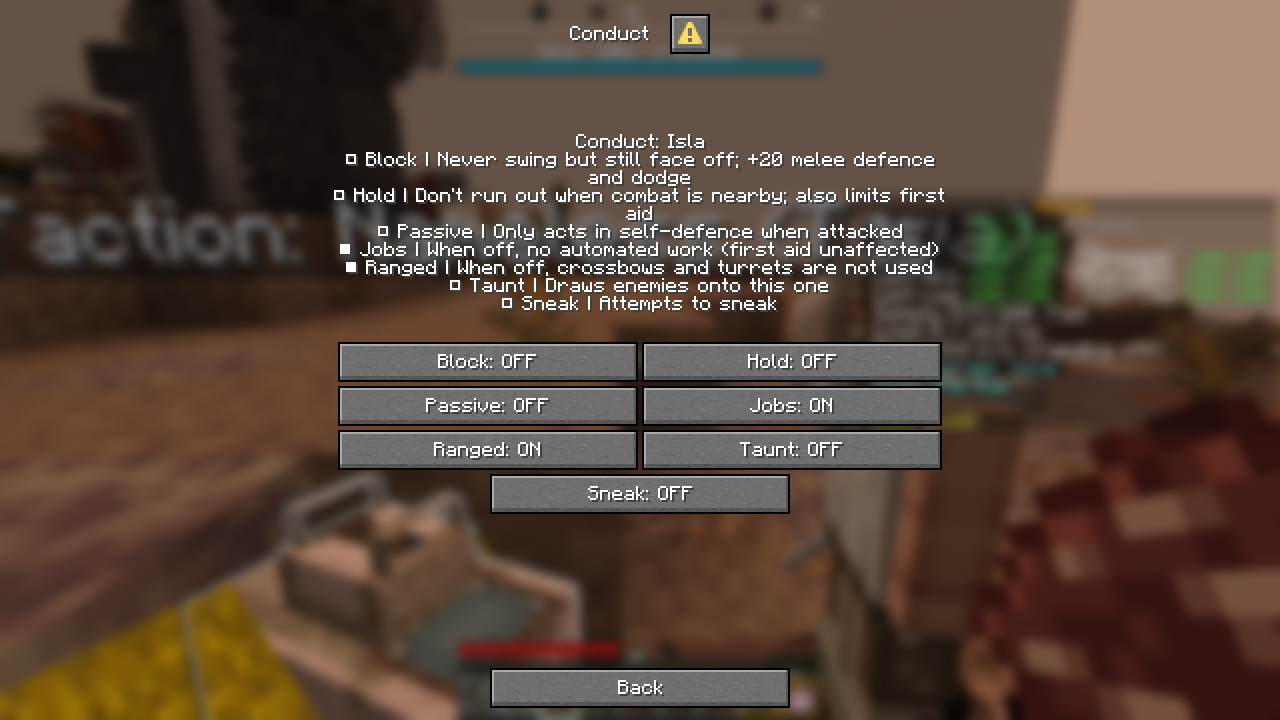
| Conduct | While it is on |
|---|---|
| Block | Only blocks, never strikes; Melee Defence and Dodge +20 |
| Hold | Doesn’t rush out even when there is fighting nearby; also shortens their first aid range |
| Passive | Only defends when attacked |
| Jobs | While off, does no automated work (first aid isn’t affected) |
| Ranged | While off, doesn’t use crossbows or turrets |
| Taunt | Draws enemies to attack this one first |
| Sneak | Tries to sneak: harder to see, but walks slowly |
Someone with Hold on stays in place and doesn’t follow you. To have them follow, turn Hold off first.
After a squad member leaves the squad, their conduct returns to the defaults.
Changing squads and renaming
Link to the “Changing squads and renaming” sectionSquads can be managed separately. Pick a squad member and press Change Squad to move them to a new squad or to a numbered squad. You can also name a squad (up to 24 characters; leave it empty to return to the number). Mercenaries and dead squad members can’t be moved, and those who have been captured can’t be moved for the time being. Downed squad members have to be picked separately on this page.
Squad members and animals you bought can be renamed on the Squad page, up to 50 characters. Leave it empty to return to the original name. The Settings page has Squad Glow, which lets you pick out your own people in a crowd.
What they do without orders
Link to the “What they do without orders” section- Give first aid to companions who are down or wounded. See First Aid.
- When someone strikes at you or a squad member, even with a blow that doesn’t land (not reaching yet, a flying kick, stopped at the outer edge, a crossbow bolt that misses) and does no damage, it still counts as an attack, and squad members and escort mercenaries fight back all the same.
- When squad members are attacked, the middle of the screen tells you. See Tracking Lost Members.
- When you are carried off, they gang up on the carrier. If you are taken away by law enforcers they don’t go to get you back, as that would mean war with a whole town.
- When you are locked up, they wait where they are.
- With Sneak Mode on, squad members following you crouch and sneak with you.
- When you go offline, squad members stay where they are and wait for you.
For who answers for a crime by a squad member, see Crime and Law.
| Situation | Number | Notes |
|---|---|---|
| How many fit in one squad | 20 | Animals count too |
| How many squads you can have | 10 | |
| How many people you can have in total | 30 | Including animals |
| How far away you can point with Order to Move | Within about 64 blocks of you | |
| How close counts as arriving with Order to Move | Within about 2 blocks | They stand and wait on arriving |
| How long Order to Move lasts at most | 60 seconds | They give up if they can’t get there |
| How far away you can point with Order to Attack | Within about 64 blocks of you | |
| How long a squad member holds a grudge after Order to Attack | 60 seconds | |
| How long you have to point at the target after choosing an order | 15 seconds | |
| What Block adds | +20 to Melee Defence and Dodge | |
| How much attention Taunt draws | About 3× the aggro when hit | |
| How close an enemy must be for someone on Hold to strike | Within about 3.5 blocks | With no grudge yet, they only watch people this close |
| How close someone must be for a member on Hold to give first aid | Within about 6 blocks | |
| How close you can get while sneaking before being seen | About 60% of the usual distance | |
| How fast you walk while sneaking | Half the usual speed | |
| The longest squad name | 24 characters | |
| The longest nickname for a squad member or animal | 50 characters |
See also
Link to the “See also” sectionOfficial siteHow to joinWorld mapFAQ
DustMoon.net is not an official product of Mojang Studios or Microsoft, and is not approved or endorsed by them.
DustMoon is inspired by the world of Kenshi and is not affiliated with Lo-Fi Games.
© 2026 DustMoon.net