
Rules Between Travellers
On DustMoon, other players are called travellers. Travellers can only help each other and cannot harm each other. It is the same in every region, with no exceptions and no duelling ground.
Travellers can talk, trade, and bandage each other. Actions that involve the other person’s body, such as carrying a downed traveller or sharing a meal, need their consent. Attacking, looting, stealing, selling, and imprisoning can’t be done to a traveller.
Recognising a traveller
Link to the “Recognising a traveller” sectionThe nameplate above a traveller’s head works the same way as a resident’s. With your crosshair on them you see the small figure (the colour of each body part shows its wounds, and it flashes while they bleed), hearts for health, a drumstick for satiety, and what they are doing right now: attacking someone, under attack by someone, carrying someone, tied up, unconscious for so many seconds, playing dead, or crawling. After the name comes “Faction: Nameless”, and the name turns grey when they are downed.
A few things on a resident’s nameplate are left off a traveller’s. Travellers can’t hit each other, so the name stays white and never turns red, and role, for hire, bounty, and lootable aren’t shown either. Where they are heading and other intentions nobody can see from outside aren’t written, and who they are attacking only shows once a hit actually lands. What they say only goes to chat.
Players can’t see their own nameplate. A traveller who is sneaking only shows a nameplate within 8 blocks and with a clear line of sight. For how to read nameplates, see Nameplates and Skeleton Eye Scope.
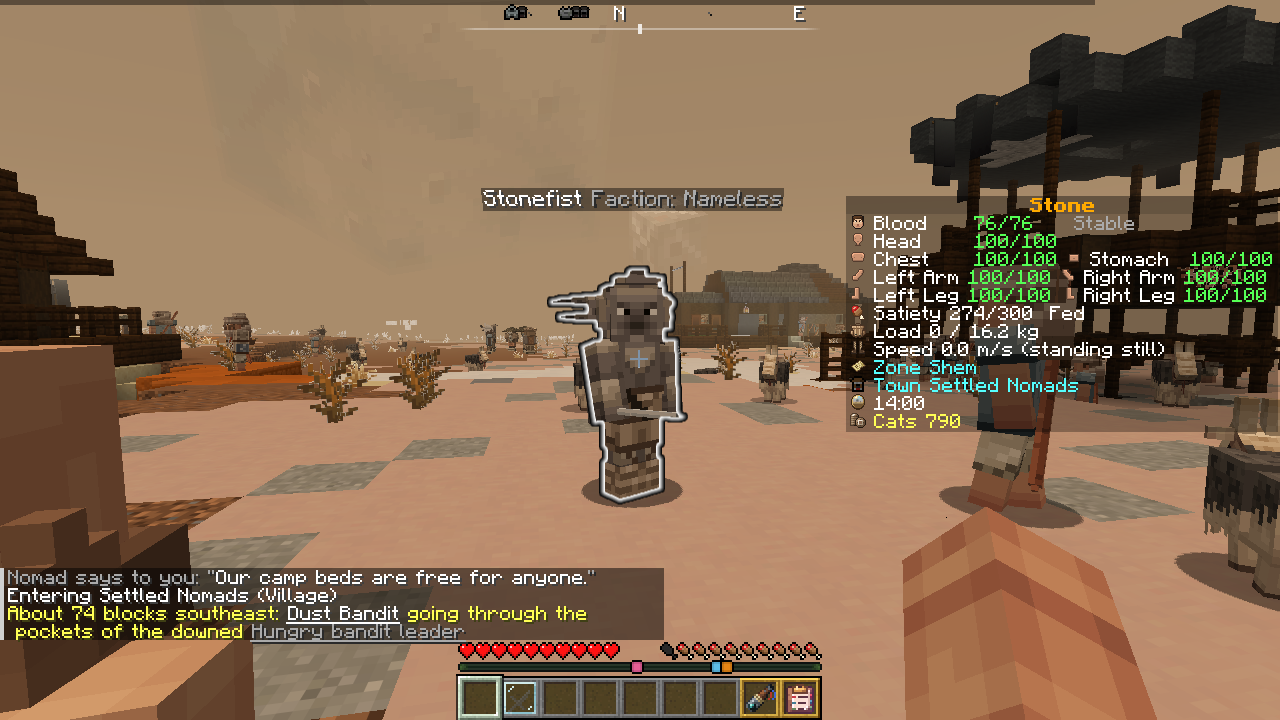
The name signed in chat is the character name, not the account name. When a member of your party comes online or goes offline, the yellow notice shows “Character name (Account)”. Switching characters produces no leave or join notice. Everywhere else a traveller’s name is written, such as the nameplates of rented and wanted copies, the price box in a bar, the party fast travel vote, and the party section of the Tab list, it is likewise “Character name (Account)”, written only once when the character name and the account are the same.
The interaction menu
Link to the “The interaction menu” sectionPress Use on a traveller to open the same interaction menu as for residents.
- When they are standing: you can use Talk, Trade, and Bandage. With food in your hand, you can also use Share a Meal. Attack, Knock Out, Assassinate, and Steal are shown in grey.
- When they are downed: you can use Bandage, Carry, Trade, and Talk. Loot is shown in grey.
Options you can’t use don’t disappear. They are shown in grey. When you hover over one or press it, the screen gives the reason: “X is a traveller. Travellers only help each other”.
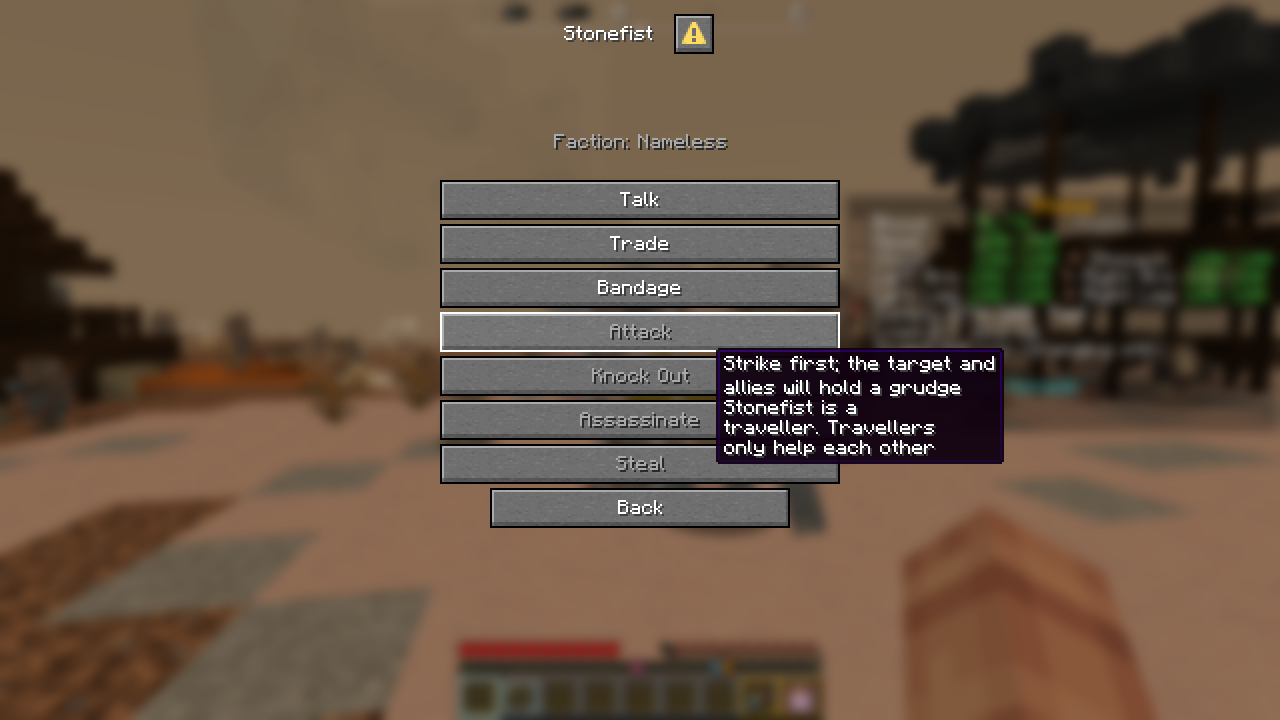
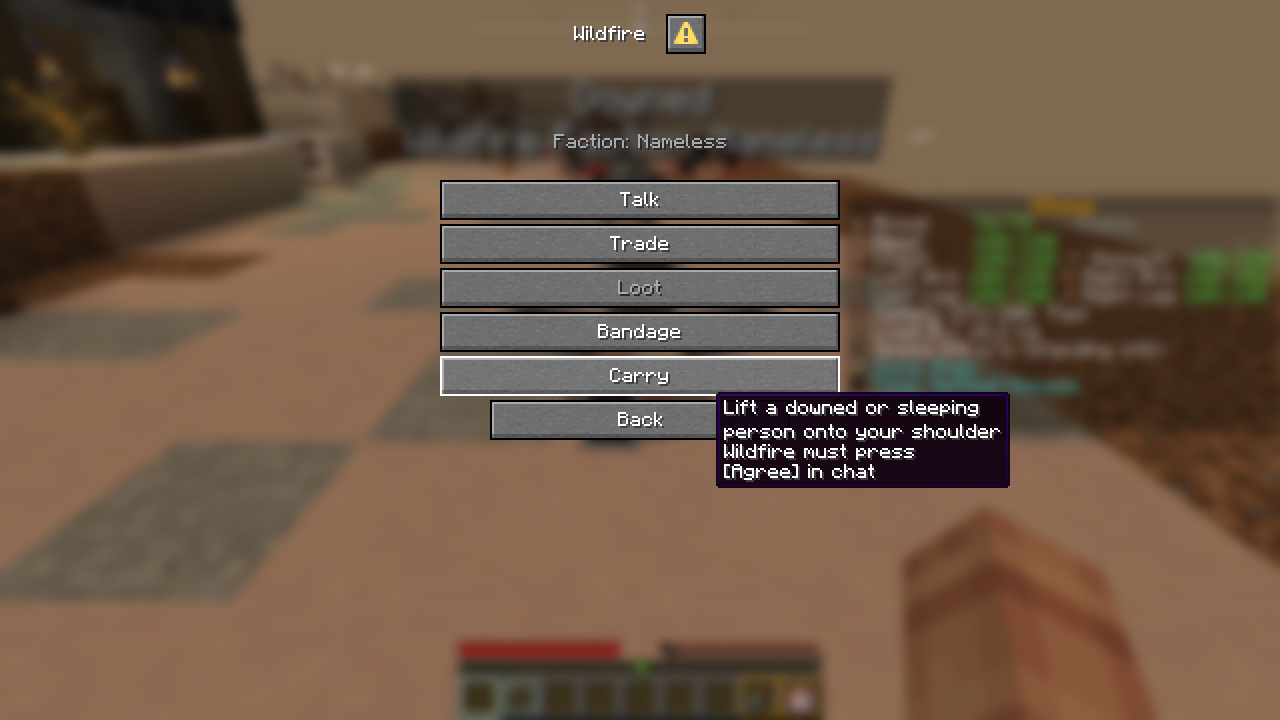
Choosing Talk fills chat with “@” and the character name in advance. Travellers talk to each other through chat.
How far talk carries
Link to the “How far talk carries” sectionWhat you say in chat is seen only by people nearby:
- People within 128 blocks with a clear line of sight can see what you say.
- Through a wall, they have to be within about 3 blocks and on the same floor to see it. People within 2 blocks always see it.
- The range is measured from where the character is, including while you use the third-person camera or navigation. For a character locked in a cell, it is measured from the cell.
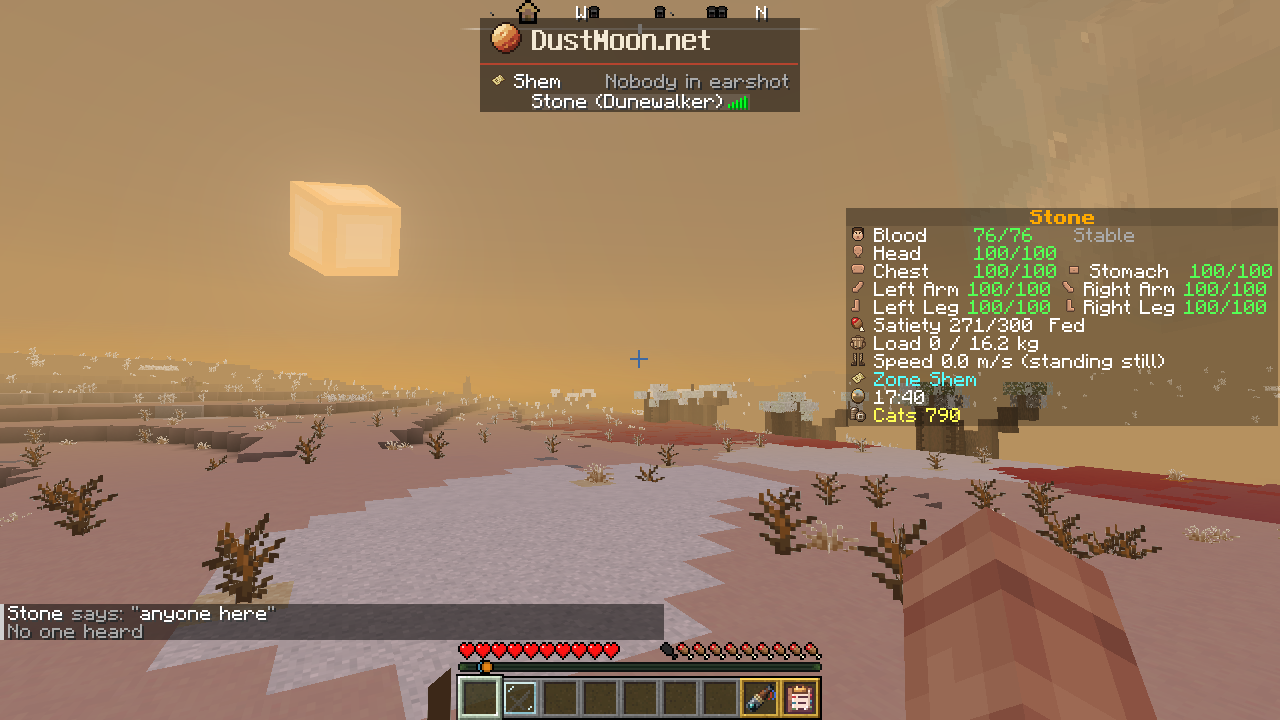
- When nobody else is nearby, a faint “No one heard” appears on screen.
Whispers
Link to the “Whispers” sectionWhat you say while crouching or sneaking is a whisper, seen only by people within 4 blocks. Those who see it read “X whispers: “…”” in chat. If nobody else is within 4 blocks, nobody sees the whisper.
Automatic translation
Link to the “Automatic translation” sectionWhen travellers using Chinese and English are near each other, chat translates what is said into the language the other uses. The translated text appears a little later. If translation fails, the original is shown with “(not translated)” added.
The player list
Link to the “The player list” sectionDustMoon has no server-wide player list. When you press Tab, the top shows where you are now and who owns it; under “Party” only the members of your party (written as “Character name (Account)”) and their states are listed; and one more line reads “N in earshot within 128 m”. Notices of members coming online and going offline are also sent only to people in the same party.
Damage and attack orders
Link to the “Damage and attack orders” sectionMelee attacks can’t damage a traveller, and the action bar gives the reason in faint text. Crossbow bolts pass through travellers, their companions, and bodies, and fly on towards the target behind. A big attack, or a squad member attacking unprompted in a fight, deals no damage when it catches a traveller and shows no message. So in a brawl you don’t need to worry about hurting other travellers by accident.
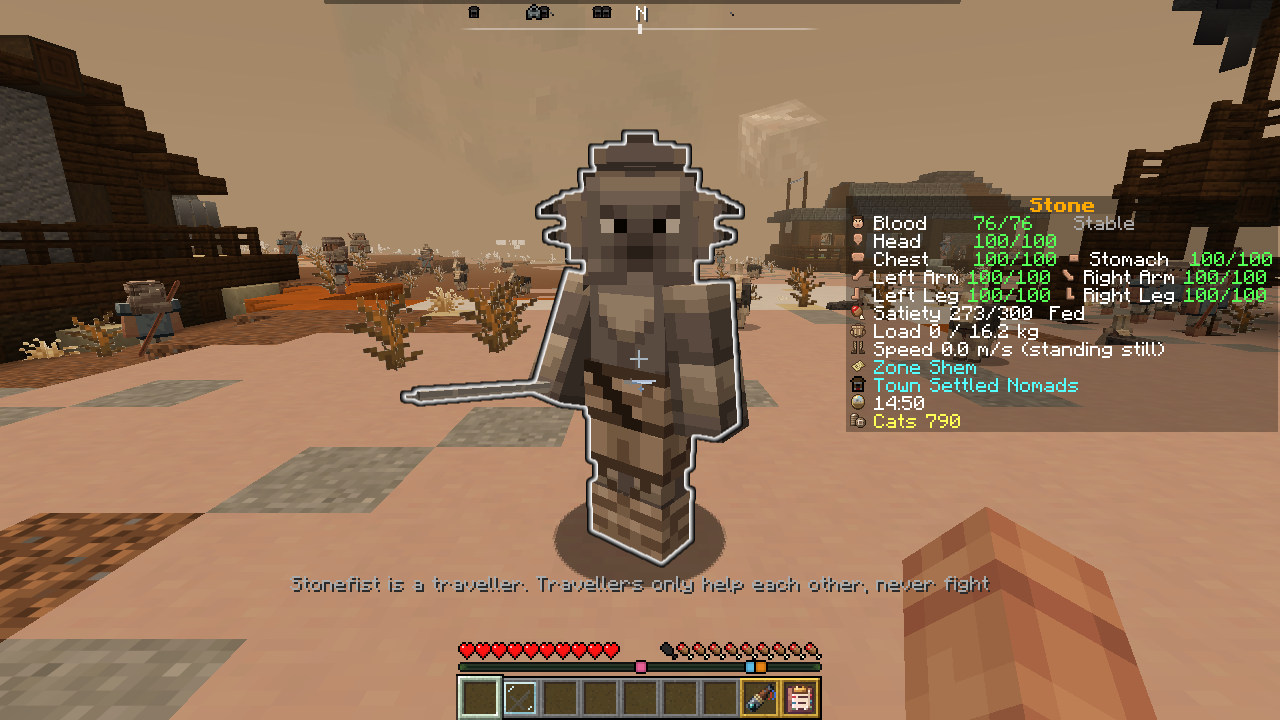
When you order a squad member to attack a traveller or a traveller’s companion, the order isn’t carried out, and the screen says there can be no attack order.
Companions and bodies
Link to the “Companions and bodies” sectionA traveller’s companions and bodies can’t be harmed or disposed of either.
- Companions: another traveller’s squad members, mercenaries on contract, pets, and people they bought all count as that traveller’s companions. Companions can’t be attacked, looted, stolen from, or sold. To carry a downed companion you need its owner’s consent, and you have to do the carrying yourself. You can’t order a squad member to do it for you. See Carrying and Consent.
- Bodies: a traveller’s body can’t be looted, hacked open, carried off, burned, or put in a Body Bag. The screen reads “only locals might”. Items that didn’t fit on the body and fell to the ground can’t be picked up by other travellers either. For how to recover your own body, see Death and Respawn.
- Handing over: a traveller can’t be handed to the guards for a bounty. The guards explain that the bounty is only for the wanted copy in the wild, brought in alive. A traveller also can’t be sold to a slaver, put in a prisoner cage, or tied to a prisoner pole.
Other characters on the same account count as other travellers too, and the same rules apply.
Common situations
Link to the “Common situations” section- Helping a downed traveller: Bandage can be used directly. Carry needs them to press Agree in chat.
- Exchanging items: use Trade. See Trading and Dropped Items.
- An option is grey: the action doesn’t apply to travellers. Nothing is broken.
The table below lists the result of doing each thing to a traveller, a traveller’s companion, and a body. Bodies here include those of travellers and of travellers’ companions.
- ○: you can.
- △: needs consent first; it goes ahead after the traveller (or the companion’s owner) presses Agree in chat.
- ✗: can’t be done, and the screen gives the reason.
- —: this situation doesn’t come up.
| What you want to do | Traveller in person | Traveller’s companion | Body |
|---|---|---|---|
| Talk, trade, bandage | ○ | ○ | — |
| Carry when downed | △ | △, the companion’s owner consents | ✗ |
| Pick up items they dropped | △ | △, the companion’s owner consents | — |
| Share a meal | △ | △, the companion’s owner consents | — |
| Melee attack | ✗ | ✗ | ✗ |
| Attack, Knock Out, Assassinate, Steal | ✗ | ✗ | ✗ |
| Order a squad member to attack | ✗ | ✗ | ✗ |
| Order a squad member to carry | ✗ | ✗ | ✗ |
| Loot | ✗ | ✗ | ✗ |
| Sell to a slaver | ✗ | ✗ | ✗ |
| Hand to the guards for a bounty | ✗ | ✗ | ✗ |
| Put in a prisoner cage, tie to a prisoner pole | ✗ | ✗ | ✗ |
| Hack open, carry off, burn, put in a Body Bag | — | — | ✗ |
| Pick up items that fell from a body | — | — | ✗ |
| Pick up items or severed limbs that fell off them | ✗, only the owner can pick them back up | ✗, only the companion’s owner can pick them back up | — |
A crossbow bolt shot at a traveller passes through and flies on. A big attack or a squad member’s unprompted attack that catches a traveller, a traveller’s companion, or a body deals no damage, and the screen shows no message.
See also
Link to the “See also” sectionOfficial siteHow to joinWorld mapFAQ
DustMoon.net is not an official product of Mojang Studios or Microsoft, and is not approved or endorsed by them.
DustMoon is inspired by the world of Kenshi and is not affiliated with Lo-Fi Games.
© 2026 DustMoon.net