
Tracking Lost Members
A member who is not beside you has not vanished from the list. Carried off, locked up, enslaved, or dead, the Squad page keeps listing them and states what has happened and where. Click the row to point navigation there. An enslaved member can be bought back in person, and a jailed member can be bailed out. If a member died, the body and everything on it are still there and can be recovered.
The extra rows on the Squad page
Link to the “The extra rows on the Squad page” sectionOpen the Squad page from hotbar slot 9. Below the member list there are extra buttons, one per person, showing the name and the current state:
| Button text | Hover text |
|---|---|
| carried off | Who carried them off and where they were last seen |
| held captive | Tied to a prisoner pole by someone somewhere, caged by someone somewhere, jailed somewhere, or enslaved somewhere |
| posted elsewhere/elsewhere | People who have not returned to you since a server restart: ordered to hold a distant spot, sent off to work, or still somewhere else |
| unconscious | Where they collapsed |
| dead | Cause of death, where the body lies, and how many items are still on it |
| body gone | What finally happened to the body and where the items fell |
The hover text also gives the direction and distance from where you stand (if very near, it says “close by”). Up to 8 people are listed; the rest are folded into N more….
When it happens, chat tells you as well: “[X] was carried off by Y. The squad page keeps listing this member” and “[X] died: cause. The body lies at Z, navigation can be set on the squad page”.
When a squad member is attacked
Link to the “When a squad member is attacked” sectionWhen squad members are attacked (animals included), a line of gold text appears in the middle of the screen, for example “Starving Bandit is attacking [Ayan]!”. Several attacked together are merged into one line: “[Ayan] and [Redsand] are under attack!” or “3 squad members are under attack, including [Ayan]!”. Members attacked within half a second of each other share one line, lines come at least 4 seconds apart, and once a member has gone 20 seconds without being hit, the next hit counts as a new fight.
When the member is 48 blocks or more from you, or in another world, chat adds a line with the location, for example “[Ayan] is under attack by Starving Bandit. Location: the Hub, about 40 blocks northwest”. The distance is rounded to 10 blocks.
When a squad member goes down, chat gives the cause and the place: “[X] is down: cause. Location: Y”.
What you can do after clicking
Link to the “What you can do after clicking” sectionClicking a row opens that person’s detail page. The buttons appear according to the situation:
- Set as destination: the pin and arrow on the map point to the last known position, and chat states roughly how many blocks away it is. If the person is in another world, you have to go there first. This button is missing when the body has been burned, bagged and taken by someone else, or has fallen out of the world. For how to read navigation, see World Map and Navigation.
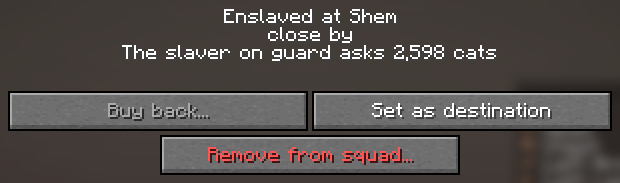
- Buy back…: only for a member who has been enslaved.
- Pay bail…: only for a member who is in jail.
- Remove from squad… (living) or Remove from list… (body): a confirmation box appears first.
- On a row whose body is already gone, Remove from list takes it off at once with no confirmation.
Getting them back
Link to the “Getting them back” sectionBuying back an enslaved member. You have to stand beside them in person (within about 8 blocks) and hand the money to the slaver guarding them. The slaver sets the price, and it varies with the member’s skills. The confirmation box says “The slaver on guard asks N cats, M cats on hand!”. Once you pay, the shackles come off and the member rejoins the squad.
Bailing out a jailed member. Walk to that police station (within about 32 blocks of the member), stand next to a police chief who takes bail (within about 7 blocks), and press Pay bail… to open the police chief’s bail menu directly. Bail is twice the bounty. For the rules on cells and bounties, see Prison.
When either button cannot go through, it gives the reason. The common ones:
- The member is not nearby: “Buying back [X] means paying the slaver on guard in person, at Z”, and navigation is pointed there at the same time.
- The member is unconscious: the buy-back has to wait until they wake up.
- No slaver nearby will take the money, or there is no police chief beside you who takes bail.
- You are tied up, locked up, or unconscious yourself: “Unable to move right now, no payment can be made”.
Tied to a pole or locked in a cage. The side holding the member does not trade (those who tie people to poles), and the detail page only says “The captors do not trade. Only a rescue gets this member out”. For opening locks and taking people out, see Lockpicking and Captives and Cages.
After a member dies
Link to the “After a member dies” sectionYou have to walk close to see the body. After a member dies, the Squad page records where the body lies and every item on it. Once you have been more than about 128 blocks away for over half a minute, the body is no longer at that spot. Walk back within about 96 blocks and the body returns to the spot, usually while you are not looking that way, after a wait of 15 seconds at most. There is only one set of items: it is never doubled and never vanishes.
The body has a magenta outline that only you can see. It is visible within 64 blocks, and nobody else sees it. The bodies of animals and mercenaries are listed and outlined in the same way. Everything worn and carried is still on the body, and you get it back by looting. Other travellers cannot loot or carry the bodies of your members and animals; see Rules Between Travellers.
The body does not rot while you stay away. A body rots only while it is at its spot. The time it spends away from the spot does not count.
Each way a body can end has its own line:
| Text on the list | Where the items went |
|---|---|
| The body rotted away | Fell on the spot |
| The body was burned | Gone |
| The body was smashed | Fell on the spot |
| Someone else bagged the body and took it | Went with the Body Bag |
| No body was left | Fell on the spot |
| Fell out of the world | The body and the items are both gone |
When you loot the body empty while standing next to it (within about 8 blocks), or put it in a Body Bag yourself, the row is cleared automatically. On looting it empty, chat says that the body of [X] has nothing left on it and the Squad page no longer lists it.
What removing a member costs you
Link to the “What removing a member costs you” sectionThe confirmation box warns you first. Read it before you press:
- Living: the Squad page no longer lists this member, and the body can no longer be tracked. Everything they carry goes with them, and bound gear can still be traced (see Bound Gear). If the member is not in the world at that moment, they only really leave the squad when you walk to where they are.
- Body: the list no longer shows it, and navigation can no longer track it. The body stays where it lies and nothing on it disappears, but you have to remember the place yourself.
| Situation | Number | Notes |
|---|---|---|
| How many people the Squad page lists at most | 8 | The rest are folded into N more… |
| How close together in time attacks on several members are merged into one line | Within 0.5 seconds | |
| How often attack alerts can come | At least 4 seconds apart | |
| How long a member must go unhit before the next attack counts as a new fight | 20 seconds | |
| How far away a member must be for chat to add their location | 48 blocks or more, or in another world | Distance rounded to 10 blocks |
| How close you must stand to buy back an enslaved member | Within about 8 blocks of them | |
| How close you must get to bail out a jailed member | The police station within about 32 blocks of them | |
| How close to the police chief you must stand for bail | Within about 7 blocks | |
| What bail costs | 2× the bounty | |
| How close you must come back for a member’s body to return to its spot | Within about 96 blocks | A wait of 15 seconds at most |
| How long until the body is no longer at its spot | 30 seconds spent more than 128 blocks away | The same when nobody is in the area or the server shuts down |
| How close you can see the magenta outline on a body | Within 64 blocks | Only you can see it |
| How close you must be for a body looted empty to leave the list | Within about 8 blocks | You have to loot it empty or bag it yourself |
| How close members must be to return to the same place after a restart | Within about 64 blocks | Those further away appear behind you |
See also
Link to the “See also” section- Carrying: carry your own people back first when they fall outside
- Prison: bail and cells
- Slavery: life after being taken as a slave
- Captives and Cages: cages, poles, and releasing people
- Death and Respawn: when you die yourself
- Animals and Pack Beasts: animals that die are listed here too
Official siteHow to joinWorld mapFAQ
DustMoon.net is not an official product of Mojang Studios or Microsoft, and is not approved or endorsed by them.
DustMoon is inspired by the world of Kenshi and is not affiliated with Lo-Fi Games.
© 2026 DustMoon.net