
Three-by-Three Crafting Grid
Right-click a work block in your outpost and a three-by-three crafting list opens, with that work block’s own recipe book on the left. Everything is made on this grid: click the recipe book and the materials are laid out for you, or lay them out yourself. When materials are short, a translucent layout appears in the grid, and the result slot shows what is still missing and where to get it next.
Five work blocks, five books
Link to the “Five work blocks, five books” sectionEach work block lists only the recipes it can make, and the book’s category is written in each recipe’s description (for example, “Weapon - Katanas”).
| Work block | What it makes | Recipes |
|---|---|---|
| Crafting Table | Tools, prosthetics, outpost goods | 89 |
| Cooking Stove | Food, alcohol | 28 |
| Smithing Table | Weapons, crossbows | 119 |
| Anvil | Iron armour | 69 |
| Loom | Clothing, leather armour | 105 |
Right-click opens the crafting list. Sneak plus right-click opens the work block screen, where you see what it is making, add fuel, and take finished items. Sneak plus right-click with fuel in hand puts the fuel straight in. Visitors can’t use your work blocks.
Colours in the recipe book
Link to the “Colours in the recipe book” sectionEach button in the book carries two markings:
- Background: bright green means you can make it now (enough materials, no missing blueprint); dark grey means you can’t make it yet.
- Frame: no frame means no blueprint is needed; a red frame means a blueprint is needed and you don’t have it; a blue frame means the blueprint is already learned; a gold frame means you can make it without learning, and learning gives higher quality.
Hover over a button and the last few lines of the description give the blueprint’s status and what clicking will do. When the same item can be made several ways (for example, one weapon in an Iron Plates tier, an Iron Plates and Fabrics tier, and a Steel Bars and Fabrics tier), it takes up only one button in the book. Click it, and what gets laid out is the way you have the materials for and are able to learn; for weapons, it is the highest model tier you can make.
The “Showing Craftable” filter above the recipe book can’t be used here: with the filter on, recipes you can make are hidden as well.
Clicking the recipe book
Link to the “Clicking the recipe book” section- Left-click: takes one craft’s worth of materials from your inventory and lays them on the grid.
- Shift plus left-click: lays out as many crafts as you have materials for, each slot limited to one stack of that material.
- Not enough materials: the grid is cleared and that recipe’s translucent layout appears instead. The result slot reads “Missing materials: …” and says, item by item, where to get what is missing (which work block makes it, which kind of shop sells it, where it can be mined). The action bar gives a short line too. Until you have all the materials, clicking the result slot does nothing.
- If your inventory can’t hold what was already on the grid, the grid isn’t cleared, and the action bar reads “Inventory full. Make some room first”.
Laying it out yourself
Link to the “Laying it out yourself” sectionYou can craft without clicking the book. As long as the layout and the total count match, you are making that recipe; shifting the whole pattern one slot to the side makes no difference. For a recipe you have clicked in the book, only the kinds of material and the total count have to match, and the layout is up to you.
When two recipes share a layout and you have the materials for both, the result slot reads “This layout makes several items. Pick one from the recipe book” and lists which ones it could be. Click once in the book and that settles it.
A few special slots:
- Water: for recipes that need water, 1 water is enough for 4 crafts.
- Catalyst: the recipes that copy a transcript onto Parchment need a leader’s CPU placed in the grid (for example, the CPU of Cat-Lon), and it isn’t used up. A leader’s CPU is character-bound, and putting it in your own crafting grid is fine.
Taking the result
Link to the “Taking the result” section| Where | Click the result slot | Shift plus left-click |
|---|---|---|
| A work block you placed in your outpost | Orders 1: materials move into the work block, the screen changes to the work block screen, and it is made slowly according to its work time | As many as you have materials for and the output slots can hold (64 at most) |
| A Cauldron on a Campfire, or a public work block in town | You get 1 on the spot | As many as you have materials for and your inventory can hold |
Using a public work block in town costs a fee per craft, a tenth of the finished item’s price, taken from the cats you carry. If you can’t pay, you can’t craft.
When your materials carry a marking such as stolen, bound, or origin, the finished item carries the strictest of them. Such an item can’t be dropped on the ground straight from the grid; take it into your inventory first.
Every finished craft gives experience according to its work time. When you get an item on the spot, the action bar shows a faint line, for example “Cooking +0.3”.
Recipes you haven’t learned
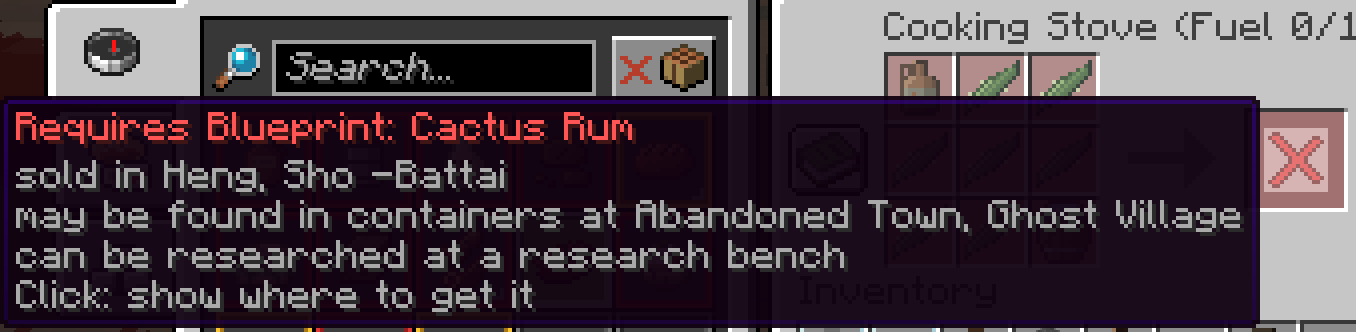
Link to the “Recipes you haven’t learned” sectionRecipes you haven’t learned are still listed in the book and still lay out their materials when clicked, but the result slot is a transparent cross. Hover over the cross to see which blueprint is needed, which shops sell it, where it may be found in a chest, and whether the research bench can research it. Click the cross and the full way to obtain it is written out on screen once more.
Not every recipe has to be learned first: some can’t be made unlearned, some can be made unlearned but with a quality cap, and some need no learning at all. Food can be made without learning the recipe, at up to 70% quality. For the details, see Blueprints, Recipes and Research.
| Situation | Number | Notes |
|---|---|---|
| How many recipes there are in all | 420 | Crafting Table 99, Cooking Stove 28, Smithing Table 119, Anvil 69, Loom 105 |
| The most you can make at once | 64 | Shift + left-click on the result slot |
| How far water goes | 1 water is enough for 4 crafts | Making n crafts takes n ÷ 4 water, with any remainder taking 1 more |
| How many missing items the preview lists | Up to 4, with 2 places to get each | Any more read “N more not listed” |
| How many missing items the action bar mentions | Up to 2 | Only the first place to get each |
| What a public work block in town costs to use | A tenth of the finished item’s price per craft | Any fraction rounds up to 1 more cat |
| Best quality for food made without learning the recipe | 70% |
See also
Link to the “See also” sectionOfficial siteHow to joinWorld mapFAQ
DustMoon.net is not an official product of Mojang Studios or Microsoft, and is not approved or endorsed by them.
DustMoon is inspired by the world of Kenshi and is not affiliated with Lo-Fi Games.
© 2026 DustMoon.net